Mawu Oyamba
This manual provides essential instructions for the safe and efficient operation, maintenance, and care of your Quest 35200 Stainless Steel Cordless Electric Coffee Percolator. Please read all instructions carefully before first use and retain this manual for future reference.

Image: The Quest 35200 Stainless Steel Cordless Electric Coffee Percolator, featuring a polished stainless steel body, black handle, and a black base with a power button.
Malangizo Ofunika Achitetezo
Mukamagwiritsa ntchito zida zamagetsi, njira zodzitetezera ziyenera kutsatiridwa nthawi zonse kuti muchepetse ngozi yamoto, kugwedezeka kwamagetsi, ndi/kapena kuvulala kwa anthu, kuphatikiza izi:
- Werengani malangizo onse.
- Osakhudza malo otentha. Gwiritsani ntchito zogwirira ntchito kapena makono.
- To protect against fire, electric shock, and injury to persons, do not immerse cord, plugs, or the percolator base in water or other liquid.
- Kuyang'anira mosamala ndikofunikira ngati chida chilichonse chikugwiritsidwa ntchito ndi ana kapena pafupi.
- Chotsani potuluka pamene simukugwiritsidwa ntchito komanso musanayeretse. Lolani kuti zizizire musanavale kapena kuvula, komanso musanatsuke chipangizocho.
- Osagwiritsa ntchito chipangizo chilichonse ndi chingwe chowonongeka kapena pulagi, kapena chipangizocho chitawonongeka kapena chawonongeka mwanjira iliyonse. Bweretsani chipangizo ku malo ochitirako ovomerezeka apafupi kuti mukaunike, kukonzanso, kapena kusintha.
- Kugwiritsa ntchito zomata zomwe sizikuvomerezedwa ndi wopanga zida kungayambitse moto, kugwedezeka kwamagetsi, kapena kuvulaza anthu.
- Osagwiritsa ntchito panja.
- Musalole chingwe chilende m'mphepete mwa tebulo kapena kauntala, kapena kukhudza malo otentha.
- Osayika kapena pafupi ndi gasi wotentha kapena choyatsira chamagetsi, kapena mu uvuni woyaka moto.
- Nthawi zonse mumangire pulagi ku chipangizo choyamba, kenaka mumakani chingwe pakhoma. Kuti musalumikizidwe, zimitsani chowongolera chilichonse kuti "zimitsa," kenako chotsani pulagi pakhoma.
- Osagwiritsa ntchito chipangizo china kupatula chomwe mukufuna.
- Kuwotcha kumatha kuchitika ngati chivindikirocho chichotsedwa panthawi yofulula moŵa.
- Chida ichi ndi chapakhomo pokha.
Zathaview ndi Features
The Quest 35200 Electric Coffee Percolator is designed for convenient coffee brewing. Key features include:
- Mapangidwe Opanda Zingwe: Allows for easy pouring and serving.
- Zomanga Zazitsulo Zosapanga dzimbiri: Chokhalitsa komanso chosavuta kuyeretsa.
- Fyuluta Yomangidwa: Eliminates the need for disposable paper filters.
- Kuchuluka kwa Malita 1.5: Brews multiple cups of coffee.
- 1100W Mphamvu: Ensures quick brewing.
- Khalani Ofunda: Maintains coffee temperature for 30-45 minutes.
- Kutseka Kwadongosolo: Enhances safety and energy efficiency.
- 360° Detachable Base: For flexible placement and easy lifting.
- Kuwala kwa Chizindikiro Cha Mphamvu: Imawonetsa momwe ntchito ikugwirira ntchito.
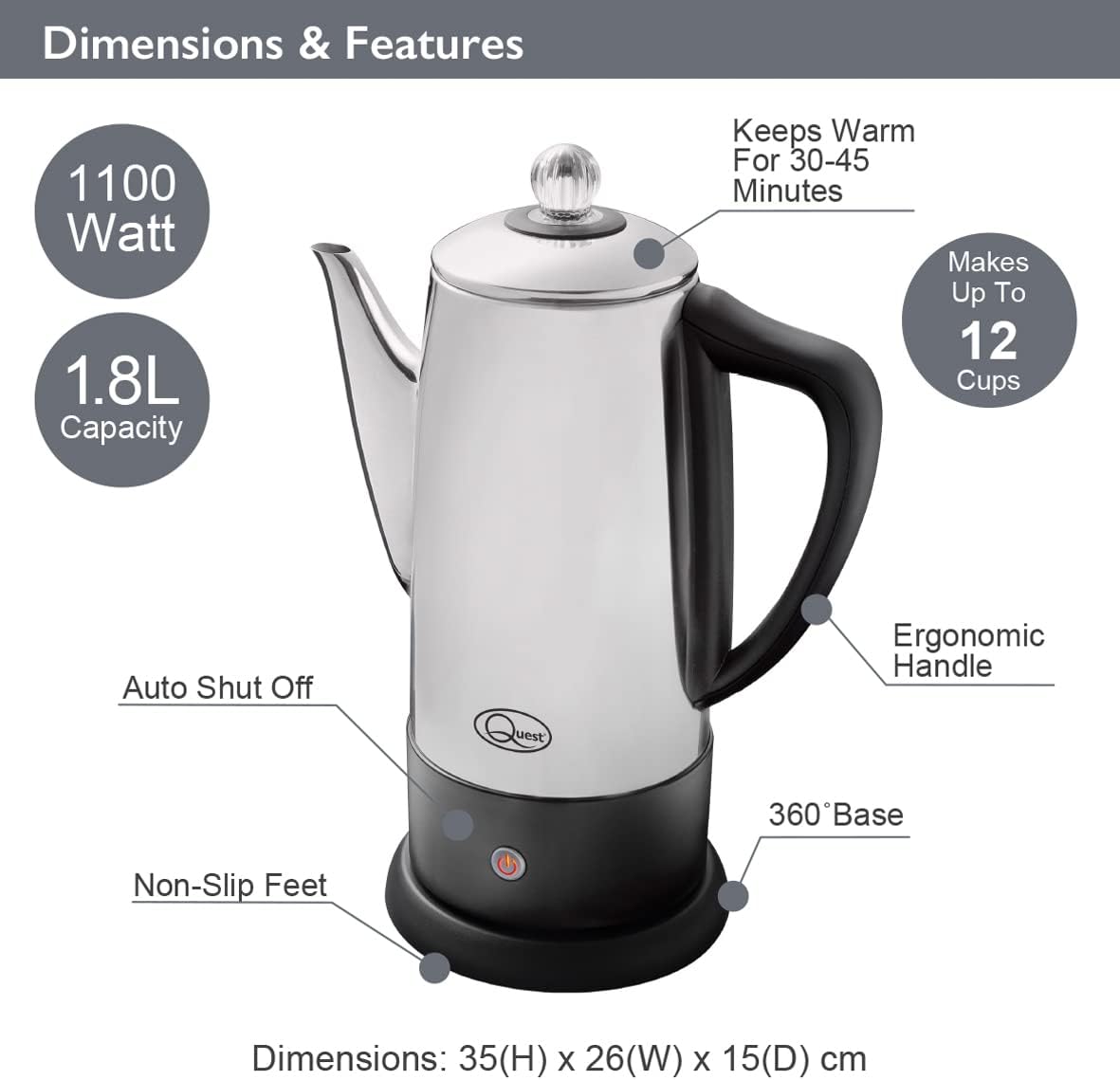
Image: Diagram illustrating the Quest 35200 percolator with callouts for its features: 1100 Watt power, 1.8L capacity (note: product title states 1.5L, using 1.8L from image), auto shut-off, non-slip feet, 360° base, ergonomic handle, keeps warm for 30-45 minutes, and makes up to 12 cups. Dimensions are 35(H) x 26(W) x 15(D) cm.

Image: A collage of four close-up views of the percolator: the interior with water level markings up to 12 cups, the removable filter basket filled with ground coffee, the illuminated power indicator light on the base, and the transparent lid knob.
Khazikitsa
- Chotsani: Carefully remove all packaging materials and inspect the percolator for any damage.
- Kuyeretsa Koyamba: Before first use, wash the interior of the percolator, the filter basket, and the stem in warm, soapy water. Rinse thoroughly and dry. Wipe the exterior with a damp nsalu.
- Kuyika: Place the percolator base on a stable, flat, heat-resistant surface, away from the edge of the counter.
- Kulumikiza Mphamvu: Onetsetsani kuti chingwe chamagetsi ndi chofikirika mosavuta komanso chosatsekeka.
Malangizo Ogwiritsira Ntchito
Follow these steps to brew coffee with your Quest 35200 percolator:
- Onjezani Madzi: Fill the percolator with cold, fresh water to your desired level, observing the internal markings. Do not exceed the maximum fill line.
- Insert Stem and Basket: Place the percolator stem into the center well of the percolator. Then, place the filter basket onto the stem.
- Onjezani Malo A Khofi: Add your preferred amount of coarse-ground coffee into the filter basket. Do not use fine-ground coffee as it may seep through the filter.
- Chivundikiro Chotetezedwa: Place the lid firmly on the percolator.
- Lumikizani Mphamvu: Place the percolator onto its 360° detachable power base. Plug the power cord into a suitable electrical outlet.
- Yambani Moŵa: Press the power button on the base. The indicator light will illuminate, signifying that brewing has begun.
- Percolation Cycle: The water will heat and begin to percolate through the coffee grounds. The brewing process typically takes several minutes, depending on the amount of water.
- Khalani Ofunda: Once the brewing cycle is complete, the percolator will automatically switch to a keep-warm mode, indicated by the power light changing color or remaining illuminated. This function keeps coffee warm for approximately 30-45 minutes.
- Perekani: Carefully remove the percolator from its base and pour coffee into cups. Be cautious of hot surfaces and steam.
- Lumikizani: After serving, unplug the percolator from the wall outlet.

Image: A visual guide showing four steps for using the percolator: 1. Adding cold water to the pot. 2. Adding ground coffee to the filter basket. 3. Pressing the power switch on the base. 4. Pouring the brewed coffee into a cup.

Image: A diagram highlighting the percolator's keep warm functionality, stating it keeps coffee warm for up to 45 minutes, has a 1.8L capacity, and makes up to 12 cups.

Chithunzi: Chapafupi view of the percolator's 360° detachable base, showing the central electrical connector.
Kusamalira ndi Kuyeretsa
Regular cleaning ensures optimal performance and longevity of your percolator.
- Nthawi Zonse Chotsani: Before cleaning, ensure the percolator is unplugged from the power outlet and has cooled down completely.
- Sassemble: Remove the lid, filter basket, and stem.
- Zigawo Zochapa: Wash the lid, filter basket, and stem in warm, soapy water. Rinse thoroughly and dry.
- Koyera Mkati: Wash the interior of the percolator with warm, soapy water and a soft sponge or brush. Rinse thoroughly to remove all soap residue.
- Koyera Kunja: Wipe the exterior of the percolator with a damp Musagwiritse ntchito zotsukira zowawasa kapena zotsukira, chifukwa izi zitha kuwononga chitsulo chosapanga dzimbiri.
- Kuyeretsa Koyambira: Pukutani magetsi ndi kutsatsaamp cloth. Never immerse the power base in water or any other liquid.
- Kuyanika: Ensure all parts are completely dry before reassembling or storing the percolator.
- Kutsika: Over time, mineral deposits may build up. To descale, fill the percolator with a mixture of equal parts water and white vinegar. Bring to a boil and let it sit for an hour before emptying and rinsing thoroughly. Repeat if necessary.
- Chitetezo chotsuka mbale: The percolator is OSATI dishwasher safe. Hand wash all components.
Kusaka zolakwika
Ngati mukukumana ndi mavuto ndi percolator yanu, onani mavuto ndi mayankho ofala awa:
| Vuto | Chifukwa Chotheka | Yankho |
|---|---|---|
| Percolator does not turn on. | Not plugged in; power button not pressed; no power at outlet. | Ensure unit is plugged in and power button is pressed. Check outlet with another appliance. |
| Khofi ndi wofooka kwambiri. | Not enough coffee grounds; coffee grounds too coarse; water level too high. | Increase coffee grounds. Use medium-coarse grounds. Reduce water level. |
| Khofi ndi wamphamvu kwambiri. | Too many coffee grounds; coffee grounds too fine; water level too low. | Reduce coffee grounds. Use coarser grounds. Increase water level. |
| Coffee grounds in brewed coffee. | Coffee grounds too fine; filter basket not seated correctly. | Use coarser grounds. Ensure filter basket is properly seated on the stem. |
| Percolator leaks. | Overfilled; lid not seated correctly. | Do not fill above the maximum line. Ensure lid is firmly and correctly placed. |
Ngati vutoli likupitilira mutatha kuyesa njirazi, chonde lemberani chithandizo chamakasitomala.
Zofotokozera
| Mbali | Tsatanetsatane |
|---|---|
| Nambala ya Model | 35200 |
| Mtundu | FUNSO |
| Mtundu | Siliva |
| Mphamvu | 1.5 malita (pafupifupi makapu 12) |
| Mphamvu | 1100W |
| Voltage | 240V |
| Mbali Yapadera | Cordless, Built-in Filter, Keep Warm Function |
| Makulidwe (L x W x H) | 13.19 x 9.25 x 6.1 mainchesi (33.5 x 23.5 x 15.5 cm) |
| Kulemera kwa chinthu | 2.2 mapaundi (1kg) |
| Otsuka mbale Safe | Ayi |
Chitsimikizo ndi Thandizo
Kuti mudziwe zambiri za chitsimikizo ndi chithandizo cha makasitomala, chonde onani zikalata zomwe zaperekedwa panthawi yogula kapena funsani wogulitsa wanu. Sungani umboni wanu wa kugula ngati pali chitsimikizo chilichonse.


