1. Mawu Oyamba
This manual provides essential instructions for the proper installation, operation, and maintenance of your Raymarine ST4000MK2 Wheel Drive. This unit is designed to integrate with a complete autopilot system and is not a standalone pilot. Please read this guide thoroughly before proceeding with installation or use to ensure safe and efficient performance.
2. Zambiri Zachitetezo
- Nthawi zonse chotsa magetsi musanayike kapena kukonza.
- Ensure all connections are secure and waterproof to prevent damage.
- Consult a qualified marine technician if you are unsure about any installation steps.
- This device is part of a larger system; refer to your main autopilot unit's manual for complete operational safety guidelines.
3. Zomwe zili mu Bokosi
Mukamasula, onetsetsani kuti zigawo zonse zilipo:
- Raymarine ST4000MK2 Wheel Drive Unit
- Zipangizo Zoyikira (zomangira, zotsukira, mtedza)
- Buku Lachidziwitso (chikalata ichi)
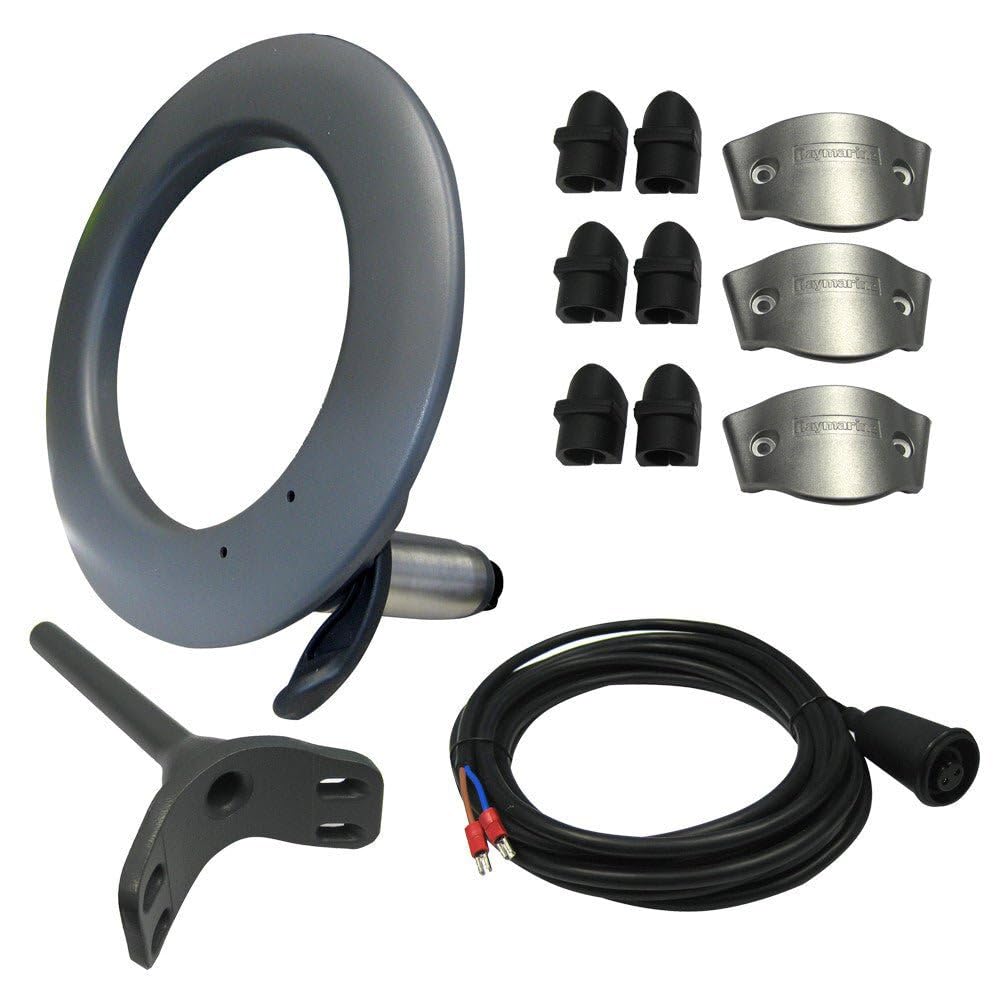
Chithunzi 1: Raymarine ST4000MK2 Wheel Drive unit. This image shows the main wheel drive component.
4. Unsembe Guide
The following steps detail the installation process for the ST4000MK2 Wheel Drive. For a visual guide, please refer to the installation video below.
Kanema 1: Installation process for the Raymarine ST4000MK2 Wheel Drive. This video demonstrates the disassembly and reassembly of the wheel drive unit, including the alignment of components and tightening of fasteners.
4.1 Disassembly (if replacing an old unit)
- Chotsani Chida Chakale: Carefully unscrew and remove the existing wheel drive unit from the steering wheel.
- Detach Components: Separate the main drive ring from the mounting plate. Remove any rubber or plastic components from the old unit.
- Malo Oyera: Ensure the mounting surface on the steering wheel is clean and free of debris.
4.2 Reassembly and New Unit Installation
- Attach Rubber Ring: Place the rubber ring onto the inner part of the new wheel drive unit. Ensure it slides on smoothly and is seated correctly.
- Secure Drive Ring: Position the main drive ring onto the mounting plate. Ensure all internal components are properly aligned and seated.
- Align Arrows: Locate the alignment arrows on both the inner and outer parts of the wheel drive unit. Carefully align these arrows to ensure proper fitment and function. This alignment is crucial for the mounting holes to match up correctly.
- Mount to Steering Wheel: Place the assembled wheel drive unit onto the boat's steering wheel. Ensure the mounting holes on the wheel drive align with the spokes or mounting points on your steering wheel.
- Limbikitsani Fasteners: Secure the wheel drive unit to the steering wheel using the provided fasteners. Tighten all screws evenly to ensure a snug and stable fit. Do not overtighten.
- Kuwona Komaliza: Once installed, manually rotate the steering wheel to confirm smooth operation and ensure there is no binding or excessive play in the wheel drive unit.
5. Malangizo Ogwiritsira Ntchito
The Raymarine ST4000MK2 Wheel Drive is a component of a larger autopilot system. Its operation is controlled by the main autopilot head unit (sold separately). Refer to your autopilot system's user manual for detailed operating instructions, including engaging/disengaging the autopilot, setting courses, and adjusting parameters.
Ensure the wheel drive is securely engaged before activating the autopilot. Disengage the autopilot before manually steering the vessel.
6. Kusamalira
- Kuyendera Kwanthawi Zonse: Periodically inspect the wheel drive unit for any signs of wear, damage, or loose fasteners.
- Kuyeretsa: Clean the unit with fresh water and a soft cloth to remove salt, dirt, and other marine contaminants. Avoid using harsh chemicals or abrasive cleaners.
- Mafuta: Consult your main autopilot manual for any specific lubrication requirements for the drive mechanism.
- Onani Chingwe: Inspect the electrical cables for chafing or damage. Ensure connections remain tight and corrosion-free.
7. Mavuto
- Unit Not Engaging: Check all electrical connections and ensure the main autopilot unit is powered on and functioning correctly. Verify the wheel drive is properly installed and aligned.
- Phokoso/Kugwedezeka Kwachilendo: Inspect the unit for loose components or foreign objects. Ensure the drive belt (if applicable) is correctly tensioned and free from damage.
- Erratic Steering: This may indicate an issue with the main autopilot computer or sensor. Refer to your autopilot system's manual for diagnostic steps.
- Nkhani Za Mphamvu: Check the vessel's power supply and circuit breakers. Ensure the autopilot system is receiving adequate voltage.
8. Zofotokozera
| Mbali | Tsatanetsatane |
|---|---|
| Mtundu | Raymarine |
| Dzina lachitsanzo | ST4000MK2 Wheel Drive |
| Mtundu Wamagalimoto | Boti |
| Zakuthupi | Pulasitiki |
| Kulemera kwa chinthu | Mapaundi 7.1 (3221 magalamu) |
| Makulidwe azinthu (LxWxH) | 16 x 15 x 8 mainchesi |
| UPC | 088022133166, 691289200337, 125310991609, 611104305511, 723193120934 |
9. Chidziwitso cha Chitsimikizo
This product comes with a standard manufacturer's warranty. For specific details regarding coverage, duration, and claims procedures, please refer to the official Raymarine warranty documentation included with your purchase or visit the Raymarine website. The warranty description provided is: Chitsimikizo.
10. Thandizo
For technical assistance, troubleshooting, or further information, please contact Raymarine Customer Support. You can typically find contact details on the official Raymarine webtsamba kapena zolemba zoperekedwa ndi malonda anu.
Zothandizira pa intaneti: Visit the Raymarine website for FAQs, software updates, and additional product information.