Mawu Oyamba
This manual provides essential information for the proper setup, operation, and maintenance of your Sony STR-DN1040 7.2-Channel Network A/V Receiver. Please read this manual thoroughly before using the receiver to ensure optimal performance and safety. Keep this manual for future reference.
1. Kukhazikitsa
1.1 Kutsegula ndi Kuyika
Carefully remove the receiver from its packaging. Place the receiver on a stable, level surface with adequate ventilation to prevent overheating. Ensure there is sufficient space around the unit for airflow.
1.2 Kulumikiza zida zanu
The STR-DN1040 receiver offers extensive connectivity options for your home theater system. Refer to the rear panel diagram below for connection points.

Kulumikizana kwa HDMI: The receiver features 8 HDMI inputs and 2 HDMI outputs (one with ARC support). Connect your Blu-ray player, gaming console, cable box, and other HDMI-enabled devices to the HDMI IN ports. Connect your TV or projector to the HDMI OUT (ARC) port for audio return channel functionality.
Kulumikizana ndi Spika: Connect your speakers to the corresponding terminals on the rear panel. The receiver supports 7.2-channel configurations. Ensure correct polarity (+ to + and - to -) for all speaker connections. The impedance range for speakers is 6-16 ohms.
Other Audio/Video Connections: Utilize the coaxial, optical, and component video inputs for older devices or specific audio sources. Analog audio inputs are also available.
1.3 Wizard Yoyambira Yoyambira
The STR-DN1040 includes an easy setup wizard to guide you through the initial configuration process. This on-screen interface simplifies connecting to the internet, setting up speakers, and adjusting basic settings.
1.4 Auto Calibration
For optimal sound performance, use the included calibration microphone to perform an automatic speaker setup. Place the microphone at your primary listening position, and the receiver will automatically adjust settings based on speaker distance, delays, and placement.
1.5 Zokonda pa Network
The receiver supports both wired and wireless network connections. Follow the on-screen prompts to connect your receiver to your home network. This enables access to streaming services and firmware updates.

2. Kugwiritsa Ntchito Wolandira
2.1 Kuyatsa/Kuzimitsa
Dinani pa MPHAMVU button on the front panel or remote control to turn the receiver on or off.
2.2 Kusankha Zolowetsa
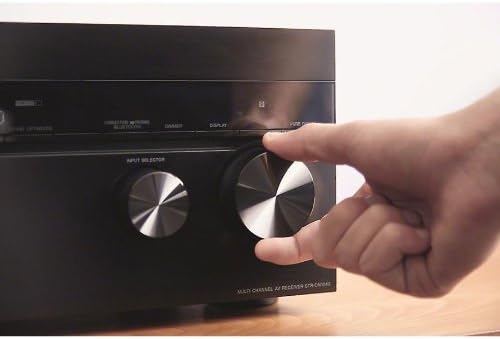
Gwiritsani ntchito WOSANKHA WOSANKHA knob on the front panel or the dedicated input buttons on the remote control to switch between connected devices (e.g., BD, DVD, Game, SAT/CATV, Video 1, TV).
2.3 Kuwongolera Voliyumu
Adjust the master volume using the large MBUYA VOLUME kondomu pa gulu lakutsogolo kapena VOLUME +/- mabatani pa remote control.
2.4 Wireless Connectivity (Wi-Fi, Bluetooth, AirPlay)
The STR-DN1040 features built-in Wi-Fi, Bluetooth, and AirPlay for seamless wireless audio streaming.
- Bulutufi: Pair your Bluetooth-enabled smartphone or tablet with the receiver. Use the pairing button or menu option to connect. You can pair up to nine Bluetooth devices.
- AirPlay: Stream music from your iPhone, iPad, or iTunes directly to the receiver. Select the STR-DN1040 from your AirPlay-compatible device.
- Wifi: Connect to your home network for access to online music services and network features.
2.5 Network Services
Access a variety of music streaming services directly through the receiver when connected to your network. Supported services include Pandora, Music Unlimited, Slacker, and vTuner.
2.6 Sound Optimizer
The Sound Optimizer feature allows you to hear every sound effect clearly, even at low volumes. It automatically recalibrates audio to maintain sound presence regardless of volume level, ensuring a complete audio experience without missing subtle details.
2.7 Front Height Effect
Enhance your audio experience with the Front Height Effect, which utilizes speakers placed above your regular front speakers. This creates a more realistic and immersive 3D audio soundstage, delivering superior audio effects with crystal-clear detail.
3. Audio Quality and Design
The Sony STR-DN1040 receiver is engineered for superior sound performance, incorporating meticulous design and high-quality components.
3.1 Precision Tuning
Sony's audio engineers meticulously tuned the receiver's audio quality using various studio and live recordings. Adjustments were made to optimize every sound, ensuring an ideal listening experience. This includes careful management of internal cabling and component placement to enhance vocal clarity and widen the sound field.
3.2 HD Digital Cinema Sound
The receiver incorporates HD Digital Cinema Sound technology, which mimics the acoustic characteristics of a movie theater. This brings a cinematic audio experience directly into your home, providing immersive and dynamic sound for movies and other content.
3.3 Redesigned Chassis and Components
The STR-DN1040 features a completely redesigned chassis to deliver superior sound performance. Key internal components include:
- Larger Transformer: A transformer larger than those in previous models is included to increase overall power and sound output, providing strong rhythmic bass and stable mid-range/high-frequency performance.
- Custom-Made Large Capacitors: Two large, custom-designed capacitors secure an enormous power supply, which is critical for consistently superior sound quality and clear separation of audio nuances.
Video 3.1: Sony STR-DN1040 Overview. Kanemayu akulongosola mwatsatanetsataneview of the Sony STR-DN1040 7.2-Channel Network A/V Receiver, showcasing its features, connectivity, setup process, and the advanced audio technologies that contribute to its high-quality sound performance. It highlights the ease of use with the setup wizard and the benefits of built-in Wi-Fi, Bluetooth, and AirPlay.
4. Zofotokozera
| Mbali | Kufotokozera |
|---|---|
| Mtundu | Sony |
| Nambala ya Model | Chithunzi cha STR-DN1040 |
| Njira | 7.2 Channel |
| Mphamvu Zotulutsa | 165 Watts per channel (8 ohms, 1kHz, 0.9% THD, 1 ch. driven) |
| Madoko a HDMI | 8 In / 2 Out (4K capable, one with ARC) |
| Kulumikizana Technology | USB, 3.5mm Jack |
| Wopanda zingwe Technology | AirPlay, Bluetooth, Wi-Fi |
| Zapadera | 3D Pass-through, Built-in AirPlay, Built-in WiFi, Firmware update, On-screen wizard, Sound Optimizer |
| Ntchito Zothandizira pa intaneti | Internet Radio, Pandora, Slacker, Spotify, iHeartRadio |
| Njira Zotulutsa Audio | Kuzungulira |
| Kulemera kwa chinthu | 22 mapaundi |
| UPC | 027242863002 |
5. Mavuto
If you encounter issues with your receiver, please refer to the following general troubleshooting steps. For more detailed solutions, consult the full service manual or Sony's official support webmalo.
- Palibe Mphamvu: Ensure the power cord is securely connected to both the receiver and a working electrical outlet.
- Palibe Phokoso: Check all speaker connections for proper polarity and secure fit. Verify that the correct input source is selected. Ensure the volume is not muted or set too low.
- Palibe Kanema: Confirm HDMI cables are correctly connected between the source device, receiver, and TV. Ensure the correct input is selected on both the receiver and the TV.
- Mavuto a Netiweki: Verify your Wi-Fi password and network settings. If using a wired connection, check the Ethernet cable. Restart your router and the receiver.
- Kuwongolera Kwakutali Sikugwira Ntchito: Yang'anani mabatire omwe ali mu remote control. Onetsetsani kuti palibe zopinga pakati pa remote ndi sensa ya IR ya wolandila.
6. Kusamalira
Proper maintenance helps ensure the longevity and optimal performance of your Sony STR-DN1040 receiver.
- Kuyeretsa: Use a soft, dry cloth to clean the exterior surfaces of the receiver. Do not use abrasive pads, scouring powder, or solvents such as alcohol or benzene.
- Mpweya wabwino: Ensure that the ventilation openings on the top and sides of the receiver are not blocked. Adequate airflow is crucial to prevent overheating.
- Chingwe cha Mphamvu: Periodically check the power cord for any damage. If damaged, discontinue use and contact a qualified service technician.
- Zosintha za Firmware: Regularly check for and install available firmware updates to ensure your receiver has the latest features and performance enhancements. These can often be performed directly through the receiver's network connection.
7. Chitsimikizo ndi Thandizo
7.1 Chidziwitso cha Chitsimikizo
This product is covered by a 90-day Limited Hardware Warranty. For full details, please refer to the official warranty document available at Sony Warranty Insert.
7.2 Thandizo la Makasitomala
Kuti mupeze thandizo lina, chithandizo chaukadaulo, kapena mafunso okhudza ntchito, chonde pitani ku chithandizo chovomerezeka cha Sony webkapena funsani chithandizo chawo kwa makasitomala. Muthanso kupeza zinthu zina ndi mafunso ofunsidwa kawirikawiri pa Sony Store pa Amazon.


