1. Mawu Oyamba
Thank you for choosing the TFA 30.5027.02 Digital Thermometer/Hygrometer. This device is designed to accurately measure and display indoor temperature and humidity, providing a clear indication of the comfort level in your environment. Its ultra-flat design and high-gloss surface make it a discreet and functional addition to any room. Please read this manual carefully to ensure proper setup and operation.
2. Zambiri Zachitetezo
- Sungani buku la malangizo ili kuti mudzagwiritse ntchito mtsogolo.
- Chipangizochi chimagwiritsidwa ntchito m'nyumba basi.
- Do not expose the device to extreme temperatures, direct sunlight, moisture, or strong vibrations.
- Osamiza chipangizocho m'madzi kapena zakumwa zina.
- Do not attempt to open or modify the device. This will void the warranty.
- Sungani mabatire kutali ndi ana. Mukameza, pitani kuchipatala mwamsanga.
- Tayani mabatire omwe agwiritsidwa ntchito molingana ndi malamulo amderalo.
- Tsukani chipangizocho ndi chofewa, damp nsalu. Osagwiritsa ntchito zotsukira abrasive kapena solvents.
3. Zamkatimu Phukusi
Chonde onetsetsani kuti zigawo zonse zilipo komanso zosawonongeka:
- 1x TFA 30.5027.02 Digital Thermometer/Hygrometer
- 1x CR2 Lithium Battery (pre-installed or separate)
- 1x Buku la Malangizo (chikalata ichi)
4. Zamalonda Zathaview
The TFA 30.5027.02 features a clear digital display showing current temperature and humidity. It also includes a comfort level indicator and a maximum/minimum value memory function.

Chithunzi 1: Patsogolo view of the TFA 30.5027.02 Digital Thermometer/Hygrometer. The display shows temperature in Celsius and relative humidity percentage, along with a comfort level icon.
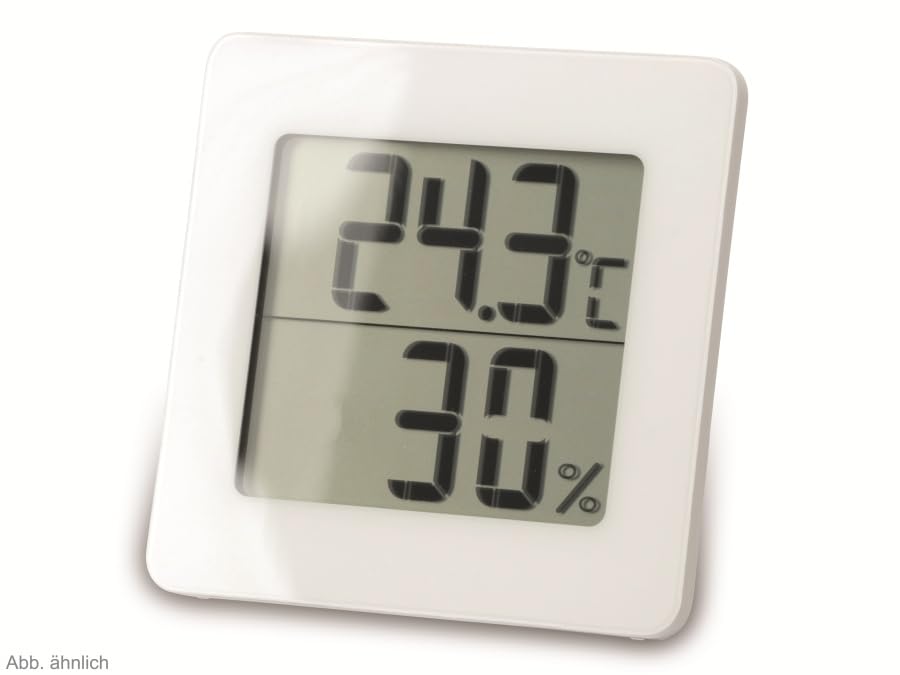
Chithunzi 2: Njira ina view of the TFA 30.5027.02 showing different temperature and humidity readings, demonstrating the device's clear digital display.
Zofunika Kwambiri:
- Digital display for temperature (°C) and humidity (% RH)
- Ultra-flat design with high-gloss finish
- Comfort level indicator (smiley icon)
- Maximum and minimum value memory function
- Zokwera pakhoma
5. Kukhazikitsa
5.1 Kuyika kwa Battery
- Pezani chivundikiro cha chipinda cha batri kumbuyo kwa chipangizocho.
- Chotsani chivundikirocho pochilowetsa kapena kuchitsegula pang'onopang'ono.
- Insert one CR2 Lithium battery, ensuring the correct polarity (+/-) as indicated inside the compartment.
- Sinthani chivundikiro cha chipinda cha batri mosamala.
- The device display should activate, showing current temperature and humidity readings.
5.2 Kuyika koyamba
For accurate readings, place the thermometer/hygrometer in a location free from direct sunlight, drafts, or heat sources. The device can be placed on a flat surface or mounted on a wall using the integrated mounting hole on the back.
- Kuyika Pakhoma: Use a small screw (not included) suitable for your wall type. Hang the device securely.
- Kuyika Pamwamba Pamwamba: Ensure the device is stable on a flat, level surface.
6. Malangizo Ogwiritsira Ntchito
6.1 Onetsaniview
The large digital display shows two main values:
- Chiwonetsero Chapamwamba: Current temperature in degrees Celsius (°C).
- Chiwonetsero Cham'munsi: Current relative humidity in percentage (% RH).
- Comfort Level Indicator: A small icon (e.g., a smiley face) indicates the current indoor climate comfort level based on temperature and humidity.
6.2 Max / Min Ntchito
The device records the maximum and minimum temperature and humidity values measured since the last reset. To access these values:
- Dinani pa MAX/MIN button (if present, typically on the back or side). The display will show the maximum recorded temperature and humidity.
- Dinani pa MAX/MIN batani ku view the minimum recorded temperature and humidity.
- Dinani pa MAX/MIN button a third time to return to current readings.
To reset the MAX/MIN values, press and hold the MAX/MIN button for a few seconds while viewing the MAX or MIN values. The memory will clear, and new maximum and minimum values will begin recording from that point.
6.3 Comfort Level Indicator
The comfort level indicator provides a quick visual reference for indoor climate conditions:
- Nkhope Yosangalala: Zimasonyeza chitonthozo chabwino kwambiri (monga, 20-25°C ndi 40-70% RH).
- Nkhope Yosalowerera Mbali: Zimasonyeza mikhalidwe yovomerezeka koma osati yabwino kwambiri.
- Nkhope Yachisoni: Indicates uncomfortable conditions (e.g., too dry, too humid, too hot, or too cold).
Note: Specific ranges for comfort levels may vary slightly by model. Refer to the device's display for the exact icon representation.
7. Kusamalira
7.1 Kuyeretsa
Tsukani chipangizocho ndi chofewa pang'ono damp cloth. Do not use abrasive cleaning agents, solvents, or alcohol, as these can damage the surface and display.
7.2 Kusintha kwa Battery
When the battery power is low, a low battery indicator (if available) will appear on the display. Replace the battery as follows:
- Tsegulani chivundikiro cha chipinda cha batri kumbuyo kwa chipangizocho.
- Remove the old CR2 Lithium battery.
- Insert a new CR2 Lithium battery, observing the correct polarity (+/-).
- Tsekani chivundikiro cha chipinda cha batri.
Note: After battery replacement, the device may reset, and MAX/MIN values will be cleared.
8. Mavuto
| Vuto | Chifukwa Chotheka | Yankho |
|---|---|---|
| Palibe mawonekedwe kapena mawonekedwe osavuta | Battery yafa kapena idayikidwa molakwika. | Replace the battery with a new CR2 Lithium battery, ensuring correct polarity. |
| Kuwerenga molakwika | Device is placed in an unsuitable location (e.g., near a window, heat source, or vent). | Relocate the device to a stable indoor environment away from direct influences. Allow 15-30 minutes for readings to stabilize. |
| Comfort indicator always shows the same face | Environmental conditions are consistently outside or within a specific comfort range. | This indicates the device is functioning correctly. Adjust your indoor environment if desired. |
9. Zofotokozera
- Nambala Yachitsanzo: 30.5027.02
- Mtundu: TFA
- Mtundu: Choyera
- Makulidwe a Zamalonda (L x W x H): 10 x 1.2 x 8.2 masentimita (3.94 x 0.47 x 3.23 mainchesi)
- Kulemera kwa chinthu: 70 Gramu (2.47 ounces)
- Batri: 1 x CR2 Lithium (included)
- Mtundu Wokwera: Wall Mount
- Operational Humidity Range: 20% mpaka 95% RH
- Upper Rated Temperature: 50°C (122°F)
- Kulondola kwa Kutentha: ±1°C
- Kulondola Kuwerenga kwa Kutentha: ±1°C
10. Chitsimikizo ndi Thandizo
For warranty information and customer support, please refer to the terms and conditions provided by your retailer or contact the manufacturer directly. Keep your proof of purchase for any warranty claims.
Wopanga: TFA Dostmann GmbH & Co. KG
For further assistance, please visit the official TFA webtsamba kapena funsani dipatimenti yawo yothandizira makasitomala.


