Mawu Oyamba
This manual provides essential information for the proper setup, operation, and maintenance of your Mackie 1202-VLZ3 12-Channel Compact Mixer. The 1202-VLZ3 is designed for professional audio applications, offering high-quality sound and robust construction for live sound, recording studios, and project studios. Please read this manual thoroughly before operating the unit to ensure optimal performance and longevity.
Khazikitsa
Proper setup is crucial for achieving the best audio quality and preventing damage to your equipment. Follow these steps to connect your mixer.
1. Kuyika Mwathupi
Place the mixer on a stable, flat surface. Ensure adequate ventilation around the unit to prevent overheating. Avoid placing it near sources of electromagnetic interference, such as power transformers or computer monitors.
2. Kulumikizana kwa Mphamvu
Connect the supplied AC power cord to the mixer's power input and then to a grounded AC outlet. The 1202-VLZ3 features a multi-voltage power supply for worldwide use. Ensure the power switch is in the OFF position before connecting or disconnecting power.
3. Malumikizidwe olowetsa
The 1202-VLZ3 offers various input options for microphones and line-level devices.
- Microphone Inputs (MIC 1-4): Use XLR cables to connect microphones to the MIC inputs. These inputs feature Mackie's XDR2 mic preamps. Phantom power (+48V) can be engaged for condenser microphones via a global switch.
- Line Inputs (Channels 1-4): Use 1/4-inch TRS or TS cables for line-level sources such as keyboards, drum machines, or preampopulumutsa.
- Stereo Line Inputs (Channels 5-6, 7-8, 9-10, 11-12): These stereo channels accept 1/4-inch TRS or TS cables for stereo line-level sources. Channels 5-6 and 7-8 also have mono XLR inputs for microphones.
4. Maulaliki otuluka
Connect your monitoring and recording devices to the mixer's outputs.
- Main Outputs (MAIN OUT L/R): Connect these balanced XLR or 1/4-inch TRS outputs to your main power amplifier, powered speakers, or recording interface.
- Control Room Outputs (CTL ROOM OUT L/R): Connect these 1/4-inch TRS outputs to your studio monitor speakers.
- Aux Sends (AUX SEND 1/2): Use these 1/4-inch TS outputs to send signals to external effects processors or monitor mixes.
- Tape Outputs (TAPE OUT L/R): These RCA outputs are suitable for connecting to a stereo recording device.
- Kutulutsa Kwamakutu: Connect your headphones to the 1/4-inch stereo headphone jack.
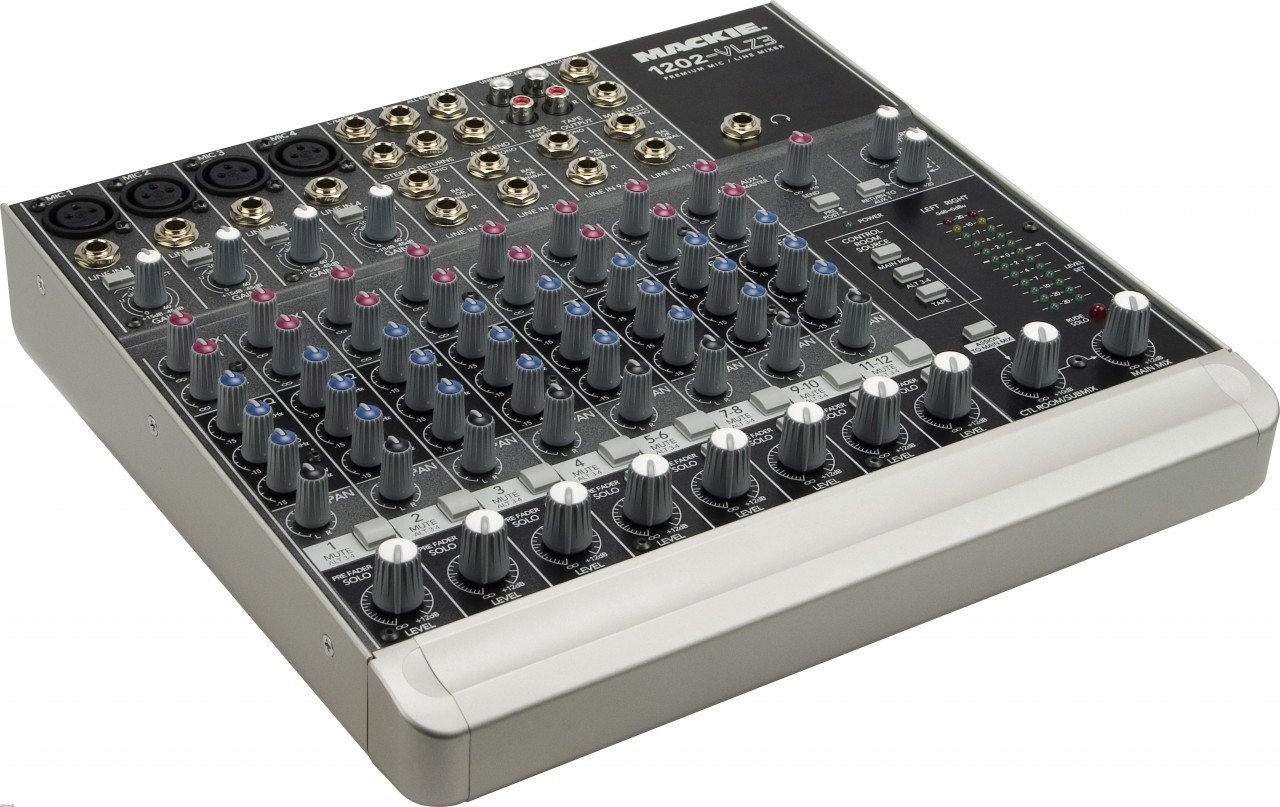
Chithunzi 1: Zathaview of the Mackie 1202-VLZ3 mixer. This image displays the entire control surface, including microphone and line inputs, channel strips with EQ and auxiliary controls, master section, and various output connections. Familiarize yourself with the layout before proceeding with operation.
Ntchito
This section details the functions of the various controls on your 1202-VLZ3 mixer.
1. Channel Controls (Mono Channels 1-4)
Each mono input channel features the following controls:
- Kupeza Mphamvu: Adjusts the input sensitivity for the microphone or line input. Set this to achieve a healthy signal level without clipping.
- Low-Cut Filter (75Hz): Engages an 18dB/octave high-pass filter at 75Hz to remove unwanted low-frequency rumble.
- Kufanana (EQ): A 3-band active EQ with High (12kHz), Mid (2.5kHz), and Low (80Hz) controls. Provides up to 15dB boost or cut.
- Aux Sends (AUX 1, AUX 2): Controls the amount of channel signal sent to the respective Aux Send outputs. AUX 1 is pre-fader, AUX 2 is post-fader.
- Pan Control: Positions the channel signal within the stereo field (left to right).
- Mute / ALT 3-4 Button: Mutes the channel from the main mix and sends it to the ALT 3-4 bus.
- PFL (Pre-Fader Listen) Solo Button: Routes the channel's pre-fader signal to the headphones and control room outputs for monitoring without affecting the main mix.
- Level Fader: Adjusts the overall output level of the channel to the main mix.
Chithunzi 2: Detail of a single channel strip on the Mackie 1202-VLZ3. This view highlights the Gain, Low-Cut, EQ (High, Mid, Low), Aux Send, Pan, Mute/ALT 3-4, PFL, and Level controls for an individual input channel.
2. Master Section Controls
The master section provides overall control and monitoring capabilities.
- Aux Returns (STEREO RETURNS 1/2): Controls the level of signals returning from external effects processors connected to the Aux Returns.
- Control Room/Phones Source Matrix: Allows selection of the source for the Control Room outputs and Headphone output (Main Mix, ALT 3-4, Tape).
- Main Mix Fader: Adjusts the overall output level of the main stereo mix.
- ALT 3-4 Level Control: Adjusts the output level of the ALT 3-4 bus.
- Level mita: Provides visual indication of the main mix output level. Aim for levels around 0 dBVU during normal operation, avoiding consistent clipping.
Chithunzi 3: Close-up of the master section of the Mackie 1202-VLZ3. This image shows the Aux Return controls, Control Room Source selection buttons, Main Mix fader, ALT 3-4 level, and the stereo LED level meters.
Kusamalira
Regular maintenance ensures the longevity and optimal performance of your mixer.
- Kuyeretsa: Use a soft, dry cloth to clean the exterior of the mixer. For stubborn dirt, a slightly damp cloth with mild soap can be used, ensuring no liquid enters the unit. Avoid abrasive cleaners or solvents.
- Chitetezo cha fumbi: Keep the mixer covered when not in use to prevent dust and grime from accumulating, especially around the sealed rotary controls.
- Posungira: If storing the mixer for an extended period, ensure it is in a dry, temperature-controlled environment.
- Kuwongolera Ma Chingwe: Use proper cable management to prevent strain on connectors and accidental disconnections.
Kusaka zolakwika
If you encounter issues with your Mackie 1202-VLZ3, refer to the following common problems and solutions before seeking professional service.
| Vuto | Chifukwa Chotheka | Yankho |
|---|---|---|
| Palibe kutulutsa mawu |
|
|
| Hum or noise in audio |
|
|
| Phokoso losokoneza |
|
|
Zofotokozera
Key technical specifications for the Mackie 1202-VLZ3 mixer:
- Makanema: 12 (4 mono mic/line, 4 stereo line)
- Mic Mapulaniamps: 4 x XDR2 Extended Dynamic Range mic preamps
- Gain Range: Ultra-wide 60dB gain range
- Dynamic Range: 130db
- THD (Mic Pre): Under 0.0007% (20Hz - 20kHz)
- EQ: 3-Band Active EQ (80Hz, 2.5kHz, 12kHz) with 15dB boost/cut
- Zosefera Zochepa: 18dB/octave 75Hz on mic input channels
- Aux Amatumiza: 2 (1 pre-fader, 1 post-fader)
- Zolowetsa Mzere: 12 high-headroom line inputs
- Mphamvu Yamphamvu: +48V (global)
- Makulidwe: Pafupifupi mainchesi 19 x 17 x 9 (48.3 x 43.2 x 22.9 cm)
- Kulemera kwake: Pafupifupi 11.6 pounds (5.26 kg)
- Magetsi: Multi-Voltage (worldwide use)
- Zomangamanga: Rugged steel chassis, co-molded potentiometers
Chitsimikizo & Thandizo
For detailed warranty information, please refer to the warranty card included with your product or visit the official Mackie website. Mackie products are known for their robust construction and reliability. If you require technical support or service, please contact Mackie customer support through their official webmalo kapena malo ogwiritsira ntchito ovomerezeka. Sungani risiti yanu yogulira ngati umboni wa kugula kwa chitsimikizo.
Mackie Official Webtsamba: www.mackie.com


