1. Mawu Oyamba
The Extech EX330 is a compact, autoranging digital multimeter designed for a wide range of electrical and electronic measurements. Its robust design and comprehensive features make it an essential tool for professionals and hobbyists alike. This manual provides detailed instructions for the safe and effective use of your EX330 multimeter.
Key features of the EX330 include:
- Omangidwa mkati osalumikizana ndi AC voltage detector (NCV) for enhanced safety.
- Large 4000-count LCD display for clear readings.
- Automatic ranging for simplified operation.
- Kuyeza AC/DC Voltage, AC/DC Current, Resistance, Capacitance, Frequency, Duty Cycle, and Temperature.
- Diode test and Continuity check functions.
- Data Hold and Max Hold features.
- Durable rubber holster for protection.
- UL listed Cat III 600V safety rating.

2. Chiyambi
2.1. Kuyika kwa Battery
The EX330 multimeter requires two AAA batteries for operation. To install or replace batteries:
- Onetsetsani kuti multimeter yazimitsidwa.
- Pezani malo osungira batri kumbuyo kwa chipangizocho.
- Gwiritsani ntchito sikukuruvayira kuti mutsegule chivundikiro cha chipinda cha batri.
- Insert two AAA batteries, observing the correct polarity (+ and -) as indicated inside the compartment.
- Bwezerani chivundikiro cha chipinda cha batri ndikuchiteteza ndi screw.
2.2. Ma Lead Oyesera Olumikizana
The multimeter comes with a set of red and black test leads. Proper connection is crucial for accurate and safe measurements.
- Always connect the black test lead to the COM (Common) input jack.
- For most voltage, resistance, and continuity measurements, connect the red test lead to the V/Ω/µA/CAP/Hz/Temp jack input.
- For current measurements up to 400mA, connect the red test lead to the mA jack input.
- For high current measurements up to 10A, connect the red test lead to the 10A jack input.

3. Malangizo Ogwiritsira Ntchito
3.1. Kuyatsa/Kuzimitsa
To turn the multimeter on, rotate the function switch from the ZIZIMA position to any desired measurement function. To turn the multimeter off, rotate the function switch back to the ZIZIMA udindo.
3.2. Function Selection (Rotary Dial)
The large rotary dial on the front of the multimeter allows you to select the desired measurement function. The EX330 features automatic ranging, which simplifies operation by automatically selecting the correct measurement range.
- VAC /VDC: Measures AC or DC Voltage.
- mA / 10A: Measures AC or DC Current (milliampayi kapena amppano).
- Ω: Measures Resistance.
- KAPA: Measures Capacitance.
- Hz /%: Measures Frequency and Duty Cycle.
- ° F / ° C: Measures Temperature in Fahrenheit or Celsius.
- Diode / Kupitilira: Tests diodes and checks for circuit continuity.
3.3. Osalumikizana Voltage (NCV) Kuzindikira
The NCV feature allows for quick detection of AC voltage without direct contact, enhancing safety when working with electrical systems. To use the NCV function, press and hold the NCV button. The top of the meter will illuminate and an audible tone will sound if AC voltage wapezeka.

3.4 VoltagKuyeza kwa e (AC/DC)
Kuyeza voltage:
- Khazikitsani kuyimba kozungulira kuti VAC or VDC monga koyenera.
- Lumikizani mayeso akuda akutsogolera ku COM jack and the red test lead to the V/Ω/µA/CAP/Hz/Temp jack.
- Connect the test probes in parallel across the circuit or component to be measured.
- Werengani voltagndi mtengo pachiwonetsero cha LCD.

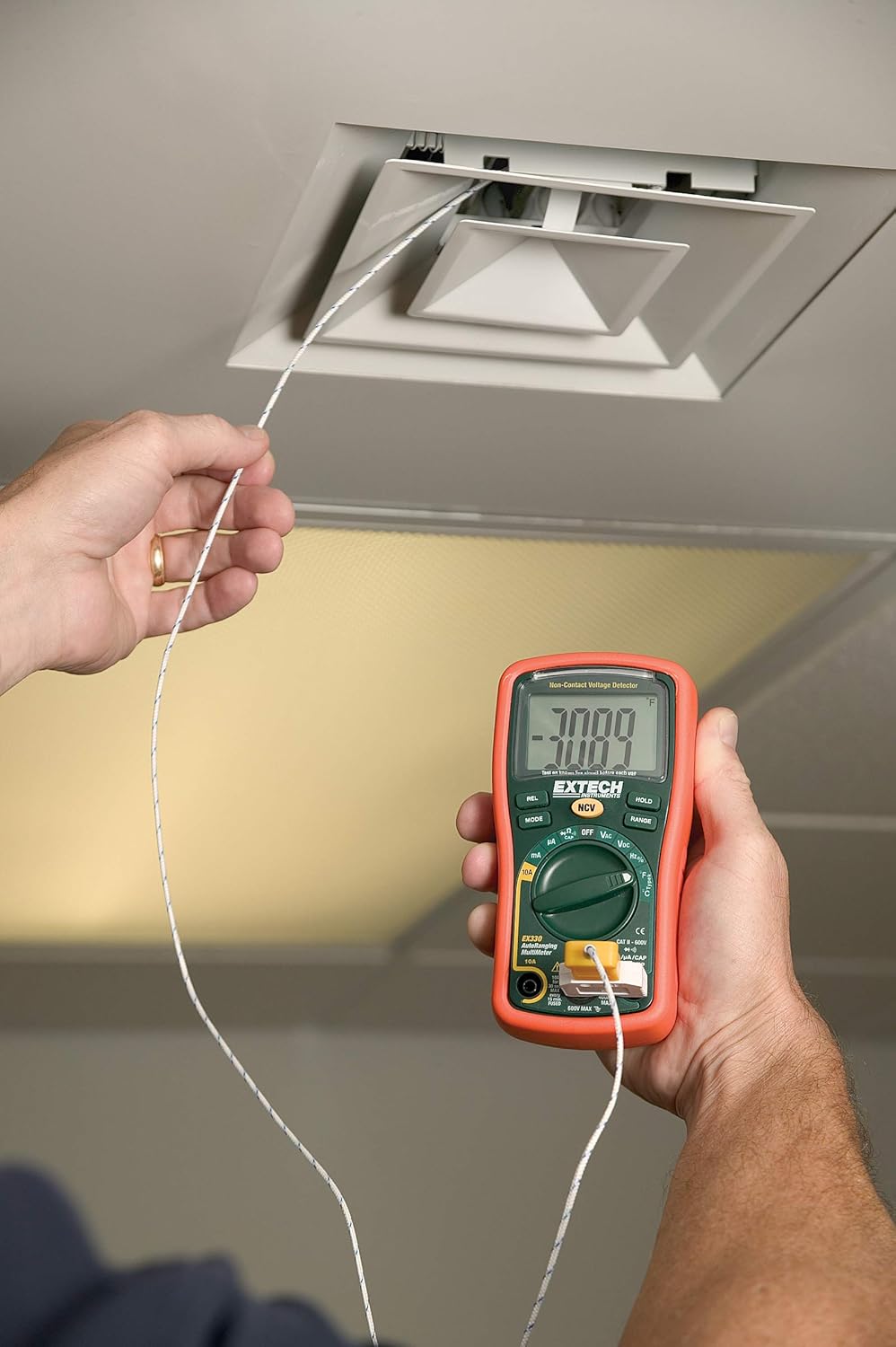
3.5. Temperature Measurement (Type K)
The EX330 includes a Type K temperature probe for accurate temperature readings.
- Khazikitsani kuyimba kozungulira kuti °F or °C.
- Plug the Type K temperature probe into the V/Ω/µA/CAP/Hz/Temp ndi COM input jacks, observing polarity.
- Place the tip of the temperature probe on or near the object whose temperature is to be measured.
- Allow time for the reading to stabilize on the display.
3.6. Data Hold and Max Hold
- Dinani pa GWANITSA button to freeze the current reading on the display. Press again to release.
- Dinani pa MODE button repeatedly while in certain functions to cycle through sub-functions or to activate MAX GWIRITSA NTCHITO, which captures and displays the maximum measured value.
3.7. Product Features Overview
Onerani vidiyoyi kuti muthe msangaview of the Extech EX330's key features and applications.
Kanema 3.1: Kupitiliraview of Extech EX330 Multimeter features, including AC/DC voltage measurement, 4000-count display, built-in non-contact voltage detector, and Type K temperature measurement.
3.8. Accuracy Demonstration
This video demonstrates the accuracy and reliability of Extech multimeters, showcasing two units providing consistent readings when measuring voltage from a power supply.
Video 3.2: Demonstration of two Extech multimeters measuring voltage from a power supply, highlighting their consistent and accurate readings over time.
4. Kusamalira ndi Kusamalira
4.1. Kuyeretsa
To clean the multimeter, use a soft, damp cloth. Do not use abrasives or solvents. Ensure the unit is off and disconnected from any circuits before cleaning.
4.2. Kusintha Battery
When the battery indicator appears on the display, replace the batteries as described in Section 2.1. Prompt battery replacement ensures continued accuracy and proper operation.
4.3. Kusintha kwa Fuse
If the multimeter fails to measure current, the fuse may need replacement. Refer to the specifications for the correct fuse type and rating. Fuse replacement should only be performed by qualified personnel.
5. Mavuto
This section addresses common issues you might encounter with your EX330 multimeter.
| Vuto | Chifukwa Chotheka | Yankho |
|---|---|---|
| Palibe mawonekedwe kapena mawonekedwe amdima | Mabatire akufa kapena otsika | Replace batteries (Section 2.1) |
| Kuwerenga molakwika | Incorrect function selected, poor test lead connection, damaged test leads | Verify function, check connections, replace test leads if damaged |
| No current measurement | Fuse yowombedwa | Replace fuse (Section 4.3) |
| NCV not detecting voltage | Voltage too low, interference, or incorrect usage | Onetsetsani kuti voltage is within detectable range, minimize interference, follow NCV instructions (Section 3.3) |
6. Mafotokozedwe aukadaulo
| Kufotokozera | Mtengo |
|---|---|
| Onetsani | 4000 Count LCD |
| AC / DC Voltage | Mpaka 600V |
| AC / DC Pompano | Mpaka 10A |
| Kukaniza | Kufikira 40MΩ |
| Kuthekera | Up to 100µF |
| pafupipafupi | Kufikira 10MHz |
| Kutentha (Mtundu K) | -4 mpaka 1382°F (-20 mpaka 750°C) |
| Zosagwirizana ndi Voltagndi (NCV) | 100 mpaka 600VAC |
| Gwero la Mphamvu | 2 x AAA mabatire (ophatikizidwa) |
| Makulidwe (L x W x H) | 5.7 x 2.9 x 1.6 mainchesi |
| Kulemera | 9.9 ounces (0.28kg) |
| Mayeso a Chitetezo | UL listed Cat III - 600V |
| Dziko lakochokera | China |

7. Chitsimikizo ndi Thandizo
7.1. Chidziwitso cha Chitsimikizo
The Extech EX330 Autoranging Mini Multimeter is covered by a 1-zaka magawo ndi ntchito chitsimikizo from the date of purchase. This warranty covers defects in materials and workmanship under normal use. It does not cover damage resulting from misuse, unauthorized modifications, accidents, or neglect.
7.2. Thandizo la Makasitomala
For technical assistance, troubleshooting, or warranty claims, please contact Extech customer support. Refer to the official Extech webtsamba lanu kapena zopangira zanu kuti mudziwe zambiri zaposachedwa.


