
1. Chidziwitso Chofunikira
Please carefully check the store name and ensure you are purchasing products sold by "LUZHAN." We have received customer feedback stating that products received did not match the description and were of poor quality. Upon investigation, we found that these customers did not purchase the products from us. To prevent such incidents from happening again in the future and to avoid unnecessary misunderstandings, please carefully verify the store name LUZHAN.

Image: Important notice to verify seller name LUZHAN for authentic products.
2. Pamwambaview
The XIAOMI POCO X8 Pro Max 5G is a high-performance smartphone designed for advanced users. It features a powerful Mediatek Dimensity 9500s processor, a vibrant 1.5K 120Hz AMOLED display, a large 8500mAh battery with 100W HyperCharge, and a 50 MP Light Fusion 600 camera system with OIS. This manual provides essential information for setting up and operating your device.
Chithunzi: Patsogolo ndi kumbuyo view of the POCO X8 Pro Max 5G smartphone.
Video: Kuthaview of the POCO X8 Pro Series, highlighting key features and design.
3. Kukhazikitsa
3.1 Zomwe zili m'bokosi
- XIAOMI POCO X8 Pro Max 5G Smartphone
- Charger
- Screen Protector (yoyikidwa kale kapena yophatikizidwa)
3.2 Kukhazikitsa Kwachida Koyamba
- Yatsani: Press and hold the power button located on the side of the device until the XIAOMI logo appears.
- Chinenero ndi Chigawo: Tsatirani zomwe zili pazenera kuti musankhe chilankhulo komanso dera lomwe mukufuna.
- Lumikizani ku Wi-Fi: Select your Wi-Fi network and enter the password to connect to the internet. This is necessary for initial setup and software updates.
- Akaunti ya Google: Lowani ndi akaunti yanu ya Google kapena pangani yatsopano. Izi ndizofunikira kuti mupeze Google Play Store ndi ntchito zina za Google.
- Kusamutsa Data: If you are upgrading from another device, you may have the option to transfer your data (apps, photos, contacts) during this stage.
- Kukonzekera kwachitetezo: Set up your preferred security method, such as a PIN, pattern, password, or fingerprint. The device supports an ultrasonic fingerprint sensor.
- Malizitsani Kukhazikitsa: Follow any remaining prompts to finalize the setup process.
3.3 SIM Card and eSIM Setup
The POCO X8 Pro Max 5G supports physical SIM cards and eSIM functionality.
- Physical SIM: Use the provided SIM ejector tool to open the SIM tray. Insert your Nano-SIM card(s) into the tray, ensuring proper orientation. Close the tray securely.
- eSIM: For eSIM activation, navigate to Zikhazikiko > Netiweki & intaneti > Ma SIM and follow the instructions to add an eSIM profile provided by your carrier.
4. Malangizo Ogwiritsira Ntchito
4.1 Zowonetsera
Your device features a 6.83-inch 1.5K ultra-bright AMOLED display with a 120Hz refresh rate for smooth visuals and a 24x super resolution touch for enhanced responsiveness. It also includes eye protection features and Corning Gorilla Glass 7i for durability.
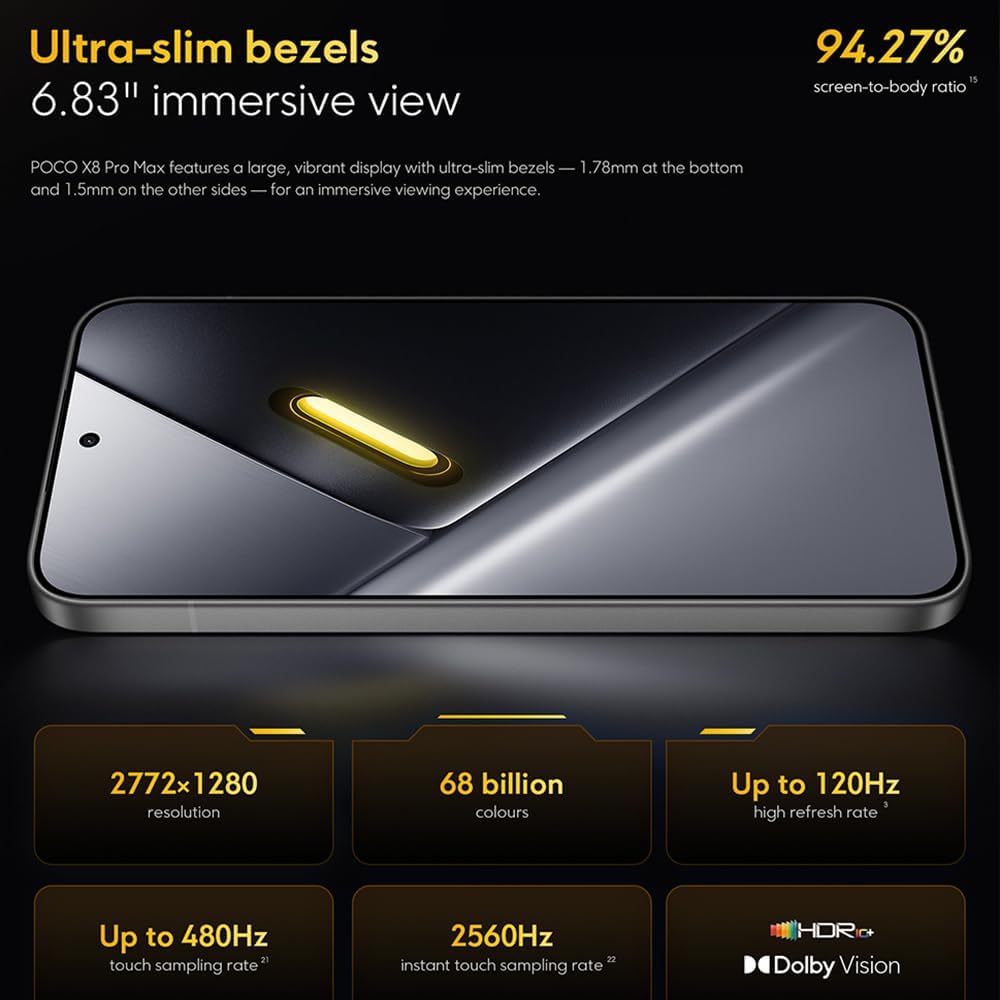
Image: The 6.83-inch 1.5K ultra-bright AMOLED display with minimal bezels.
4.2 Kuchita
Powered by the Mediatek Dimensity 9500s chipset (3nm, 4+4 All Big Core architecture, NPU890 AI processor), the POCO X8 Pro Max 5G delivers high performance. The POCO 3D IceLoop cooling system ensures efficient heat dissipation, maintaining optimal performance during intensive tasks like gaming.

Image: Diagram illustrating the Mediatek Dimensity 9500s flagship platform.

Image: Illustration of the 5800mm² ultra-large LHP area for cooling.
Makamera a 4.3
The device features a 50 MP Light Fusion 600 main camera with OIS (Optical Image Stabilization) and an 8 MP ultra-wide camera. It supports portrait mode with bokeh + HDR and dynamic video-to-still conversion.

Image: Close-up of the 50 MP main camera and 8 MP ultra-wide camera system.
4.4 Battery ndi Kulipira
Equipped with a massive 8500 mAh (typical) battery, the POCO X8 Pro Max 5G offers extended usage. It supports 100W HyperCharge, allowing for rapid recharging. A 16% ultra-high carbon-silicon content contributes to its high energy density.

Image: Illustration highlighting the massive 8500mAh battery capacity.

Image: Visual representation of the 100W HyperCharge technology.
4.5 Audio
The device features symmetrical dual stereo speakers (1115F) for a balanced and immersive audio experience.
Pulogalamu ya 4.6
The POCO X8 Pro Max 5G comes with Xiaomi HyperOS 3 installed, offering an optimized and user-friendly interface based on Android 16.
5. Kusamalira
5.1 Kuyeretsa Chipangizo Chanu
- Gwiritsani ntchito nsalu yofewa, yopanda lint kupukuta chophimba ndi gulu lakumbuyo.
- Pewani kugwiritsa ntchito mankhwala owopsa, zotayira, kapena zopopera aerosol.
- Kwa smudges amakani, pang'ono dampny nsalu yokhala ndi madzi kapena zotsukira zopangira zida zamagetsi.
5.2 Kukana Fumbi ndi Madzi
The device is certified for IP68 dust and water resistance. This means it can withstand immersion in up to 2 meters of water for 30 minutes under specific laboratory conditions. However, water and dust resistance may deteriorate over time with normal wear and tear. The warranty does not cover liquid damage. Avoid exposing the device to hot water, saltwater, or other liquids.

Image: Visual representation of the IP68 dust and water resistance.
5.3 Zosintha za Mapulogalamu
Yang'anani nthawi zonse ndikuyika zosintha zamapulogalamu kuti muwonetsetse kuti chipangizo chanu chili ndi zaposachedwa kwambiri, zotetezedwa, komanso kukonza magwiridwe antchito. Nthawi zambiri mutha kupeza izi Zikhazikiko > Zokhudza foni > Zosintha za dongosolo.
6. Mavuto
6.1 Mavuto Odziwika ndi Mayankho
- Chipangizo sichikuyatsa: Onetsetsani kuti batire yachajidwa. Lumikizani chipangizocho ku charger ndipo dikirani kwa mphindi zingapo musanayese kuyiyatsanso.
- Chojambula sichimayankha: Try restarting the device by holding the power button for an extended period (e.g., 10-15 seconds) until it reboots.
- Mapulogalamu akuwonongeka: Chotsani malo osungira pulogalamu yomwe yavuta (Zokonda> Mapulogalamu> [Dzina la Pulogalamu]> Kusungirako> Chotsani posungira) kapena yambitsanso pulogalamuyi. Onetsetsani kuti pulogalamu yachipangizo chanu ndi yaposachedwa.
- Moyo wa batri wosakwanira: Check background app usage, reduce screen brightness, disable unnecessary features like GPS or Bluetooth when not in use, and ensure your software is updated.
- Mavuto okhudzana ndi intaneti: Restart your device. Check if your SIM card is properly inserted. Toggle Airplane Mode on and off. Reset network settings (Zikhazikiko> Dongosolo> Bwezeretsani zosankha> Bwezerani Wi-Fi, mafoni & Bluetooth).
6.2 Bwezeraninso Fakitale
If you encounter persistent issues, a factory reset may be necessary. Chenjezo: Izi zichotsa deta yonse pa chipangizo chanu. Bwezerani deta yofunika musanapitirize. Pitani ku Zikhazikiko> Dongosolo> Bwezeretsani zosankha> Chotsani deta yonse (kukonzanso kwa fakitale) ndipo tsatirani malangizo a pazenera.
7. Zofotokozera
| Mbali | Kufotokozera |
|---|---|
| Mtundu | XIAOMI |
| Dzina lachitsanzo | POCO X8 Pro Max 5G |
| Opareting'i sisitimu | Android 16 (with Xiaomi HyperOS 3) |
| Memory Storage Kukhoza | 512 GB |
| Kukula kwa Screen | 6.83 inchi |
| Mtundu Wowonetsera | AMOLED, 1.5K, 120Hz refresh rate |
| Cellular Technology | 5G |
| Mtundu | Noir (Black) |
| Mtundu Wolumikizira | Mtundu wa USB C |
| Chitetezo cha Biometric | Fingerprint Recognition (Ultrasonic) |
| Mphamvu ya Battery | 8500 mAh (Lithium-polymer) |
| Kulipira | 100W HyperCharge |
| Kamera Yaikulu | 50 MP Light Fusion 600 with OIS |
| Kamera Yonse Kwambiri | 8 MP |
| Purosesa | Mediatek Dimensity 9500s |
| Kukaniza Fumbi ndi Madzi | IP68 |
| Chaka Chachitsanzo | 2025 |
| Dziko lakochokera | China |
8. Chitsimikizo ndi Thandizo
For detailed warranty information and customer support, please refer to the warranty card included with your product or visit the official XIAOMI webmalo. Sungani umboni wanu wogula kuti mutenge chitsimikizo.
Online resources and FAQs may also be available on the XIAOMI support portal.