
1. Mawu Oyamba
The DNT Optics HS650 Hydra is a versatile multi-function thermal device designed for various applications. It can operate as a standalone thermal scope, a clip-on thermal attachment for existing optics, or a handheld thermal monocular. This manual provides essential information for the proper setup, operation, and maintenance of your HS650 Hydra device.
2. Zamalonda Zathaview
2.1 Zofunika Kwambiri
- 3-in-1 Kusinthasintha: Functions as a standalone scope, clip-on attachment, and handheld monocular.
- Elite Thermal Imaging: Features a 12 µm, ≤18 mK uncooled infrared sensor with a 640×512 resolution and 50mm objective lens.
- AI-Powered Image Super Resolution (ISR): Enhances image clarity and detail, especially at higher digital zoom levels.
- Zomangamanga Zolimba: IP67-rated for waterproof and dustproof protection, shock-resistant housing handles recoil up to .50BMG.
- DNT App Connectivity: Connects to your smartphone for live feed viewing, management, editing, and sharing of content.
2.2 Zamkatimu Phukusi
Onetsetsani kuti zinthu zonse zili mu phukusi lanu:
- HS650 Thermal Scope ×1
- PMS (Picatinny 0 MOA Short) Mount ×1
- Eye Cup ×1
- Flip Up Cover ×1
- 18650 Flat Top Battery ×2
- Battery Charger ×1
- Chingwe cha USB × 2
- Buku Logwiritsa ×1
- Lens Cleaning Cloth ×1
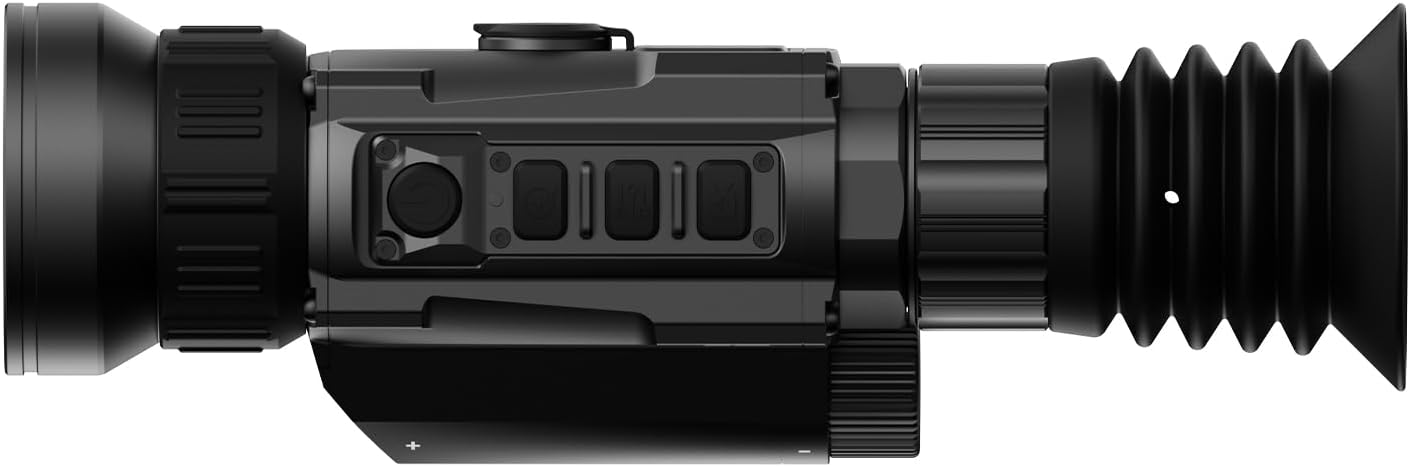
2.3 Visual Overview




3. Kukhazikitsa
3.1 Kuyika kwa Battery
- Pezani batire pa chipangizo.
- Insert two 18650 Flat Top Batteries, ensuring correct polarity.
- Tsekani motetezeka batire.
3.2 Zosankha Zokwera
The HS650 Hydra can be used in several configurations:
- Standalone Scope: Attach the provided PMS (Picatinny 0 MOA Short) mount to a compatible rail system. Ensure all screws are tightened to the recommended torque.
- Clip-On: Utilize an appropriate quick-detach mount (e.g., DNT QDM150 or QDS150, sold separately) to attach the device in front of your primary optic.
- Handheld Monocular: Use the device without any mounting for portable observation.
3.3 Initial Power-On and App Connection
- Dinani ndikugwira batani lamphamvu kuti muyatse chipangizocho.
- Download the DNT App on your smartphone.
- Follow the in-app instructions to connect your HS650 Hydra to your smartphone for live viewing and feature control.
4. Malangizo Ogwiritsira Ntchito
4.1 Zowongolera Zoyambira
Refer to the device's physical buttons for power, menu navigation, zoom, and recording functions. Detailed button assignments are available in the full user manual.
4.2 Thermal Imaging Modes
The HS650 Hydra offers various thermal imaging modes to optimize viewing for different environments and preferences. These typically include:
- Zachilengedwe: Provides a balanced thermal view.
- Enhanced: Increases contrast for better detail recognition.
- Onetsani: Emphasizes hot spots for quick target identification.
4.3 Image Super Resolution (ISR)
The AI-Powered Image Super Resolution (ISR) feature enhances image detail, especially when using digital zoom. This feature can be toggled on or off via the device menu or connected app.
4.4 Digital Zoom
The HS650 Hydra features a 2.5x base magnification with digital zoom capabilities up to 10x. Use the designated zoom buttons to adjust magnification levels.
4.5 Recoil Activated Video
The device supports Recoil Activated Video recording, which automatically captures footage when recoil is detected. This ensures important moments are recorded without manual intervention.
5. Kusamalira
5.1 Kuyeretsa
- Use the provided lens cleaning cloth to gently wipe the objective and eyepiece lenses. Avoid abrasive materials.
- For the device body, use a soft, damp nsalu yochotsa litsiro ndi zinyalala.
5.2 Kuteteza chilengedwe
The HS650 Hydra is IP67-rated, meaning it is protected against dust ingress and can withstand immersion in water up to 1 meter for 30 minutes. While robust, avoid unnecessary exposure to extreme conditions.
5.3 Kusungirako
Store the device in a cool, dry place away from direct sunlight and extreme temperatures. Remove batteries if storing for extended periods.
6. Mavuto
If you encounter issues with your DNT Optics HS650 Hydra, consider the following:
- Chipangizo sichikuyatsa: Check battery charge and ensure batteries are inserted with correct polarity.
- Zithunzi zosaoneka bwino: Ensure lenses are clean. Adjust focus and brightness settings. Verify ISR is enabled if desired.
- Mavuto okhudzana ndi pulogalamu: Ensure Bluetooth/Wi-Fi is enabled on your smartphone and the device. Restart both the device and the app.
- Mounting stability: Re-check all mounting screws for proper tightness.
For further assistance, please contact DNT Optics customer support.
7. Zofotokozera
| Mtundu | DNT Optics |
| Dzina lachitsanzo | HS650 |
| Mtundu | 640-50 |
| Mtundu | Wakuda |
| Miyeso Yazinthu | 8.4"L x 2.7"W x 2.2"H |
| Kulemera kwa chinthu | 1.02 pounds (16.3 ounces) |
| Zakuthupi | Metal or High-Quality Plastic |
| Cholinga cha Lens Diameter | 68.58 mamilimita |
| Kukulitsa Kuchepa | 2.5x |
| Zida Zogwirizana | Rifle, Shotgun, Handgun |
| Mtundu Wokwera | PMS - Picatinny 0 MOA Short |
| Masomphenya a Usiku | No (Thermal Imaging) |
| Mtundu wa Reticle | Za digito |
8. Chitsimikizo ndi Thandizo
For information regarding product warranty, returns, or technical support, please refer to the official DNT Optics website or contact their customer service directly. Contact details can typically be found on the manufacturer's packaging or webmalo.
You can visit the DNT Optics Store for more information: DNT Optics Store