
Mawu Oyamba
Thank you for choosing the Fisher Pro Active Noise Cancelling Headphones. This manual provides essential information for setting up, operating, and maintaining your headphones. Please read it thoroughly to ensure optimal performance and longevity of your device.
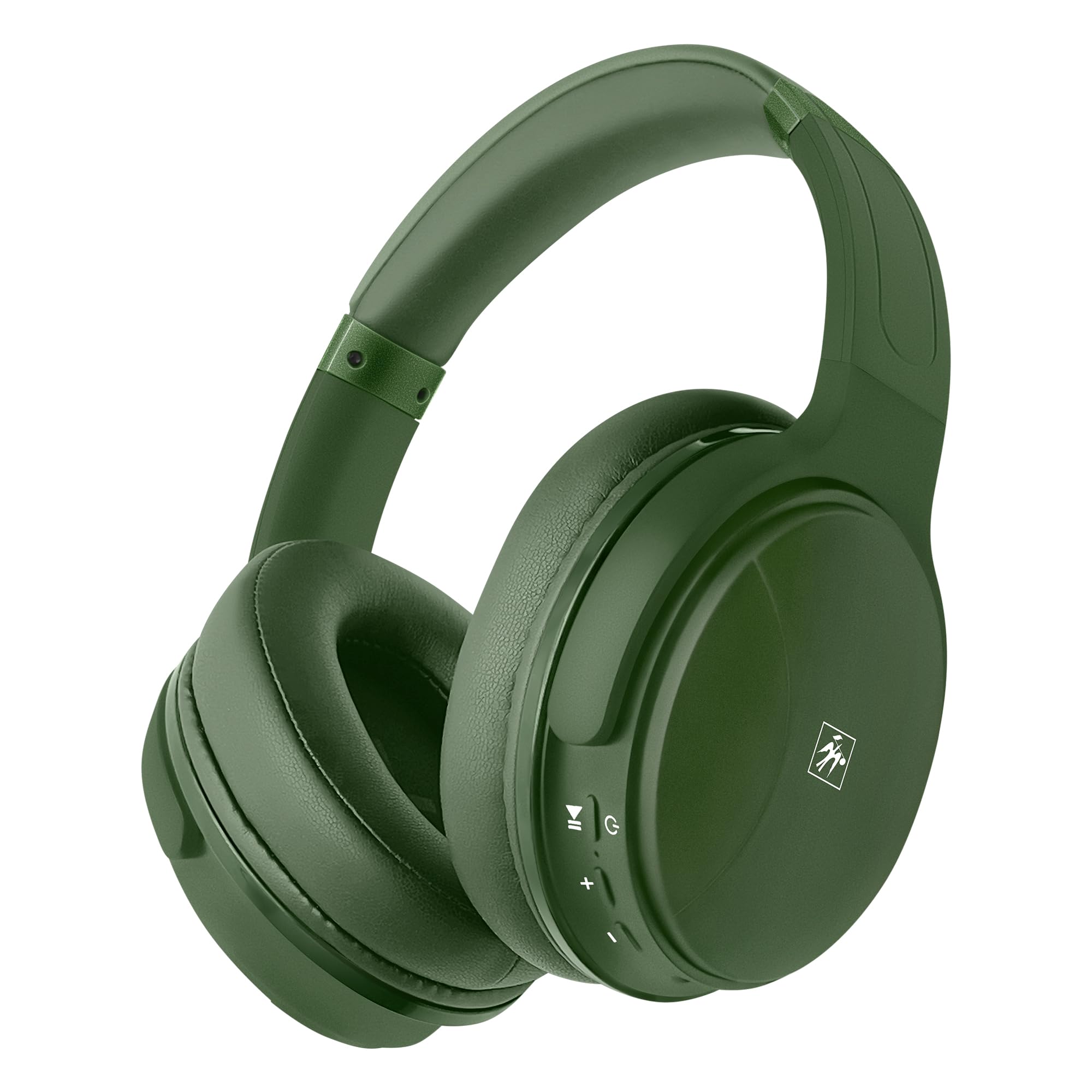
Chithunzi: Patsogolo view of the Fisher Pro Active Noise Cancelling Headphones in dark green.
Zamkatimu Phukusi
Onetsetsani kuti zinthu zonse zilipo mu phukusi:
- Fisher Pro Active Noise Cancelling Headphones
- USB-C Charging Chingwe
- 3.5mm Stereo AUX Cable
- Buku la ogwiritsa (chikalatachi)
- Khadi la chitsimikizo
Zowongolera ndi Zinthu
Familiarize yourself with the headphone controls and key features:

Image: Right earcup showing control buttons for power, volume, and ANC.
- Batani Lamphamvu: Dinani ndi kugwira kuti kuyatsa/kuzimitsa.
- Voliyumu / Yotsatira: Dinani pang'ono kuti mukweze voliyumu, dinani kwanthawi yayitali kuti mumve nyimbo yotsatira.
- Voliyumu Pansi / Njira Yakale: Dinani pang'ono kuti mutsitse voliyumu, dinani kwanthawi yayitali kuti mumve nyimbo yam'mbuyo.
- Batani la Multifunction (MFB): Sewerani/imitsani nyimbo, yankhani/imitsani mafoni, yambitsani wothandizira mawu.
- ANC Batani: Yatsani/kuzimitsa Kuletsa Phokoso.
- USB-C Doko: Kuchajisa mahedifoni.
- 3.5mm Audio Jack: Kwa kulumikizana kwa waya.
- Maikolofoni: Kwa mafoni opanda manja.

Chithunzi: Zathaview of headphone features including Active Noise Cancellation, 16-hour battery life, voice assistant support, premium sound, device compatibility, foldable design, adjustable headband, easy-access buttons, hands-free microphone, and comfort cushions.
Khazikitsa
1. Kuliza Ma Headphone
Musanagwiritse ntchito koyamba, yonjezerani mahedifoni mokwanira.
- Connect the provided USB-C charging cable to the headphone's USB-C port.
- Lumikizani mbali ina ya chingwe ku gwero lamagetsi la USB (monga adaputala ya pakhoma, doko la USB la kompyuta).
- Chizindikiro cha LED chidzawonetsa momwe kulili kolipirira (mwachitsanzo, kufiyira pakulipiritsa, buluu pakulipira kwathunthu).
A full charge provides up to 16 hours of playback. Quick charging is supported.

Image: Visual representation of the 16-hour battery life feature.
2. Kuyatsa/Kuzimitsa
- Kuyatsa: Dinani ndikusunga batani la Power kwa masekondi pafupifupi atatu mpaka chizindikiro cha LED chikawala buluu.
- Kuzimitsa: Dinani ndikugwira batani la Mphamvu kwa masekondi pafupifupi 3 mpaka chizindikiro cha LED kizimitsa.
3. Kuyanjanitsa kwa Bluetooth
Pair your headphones with a Bluetooth-enabled device:
- Onetsetsani kuti mahedifoni azimitsa.
- Press and hold the Power button for 5-7 seconds until the LED indicator flashes red and blue alternately, indicating pairing mode.
- Pa chipangizo chanu (foni yam'manja, laputopu, piritsi), yatsani Bluetooth ndikusaka zida zomwe zilipo.
- Select "Fisher Pro" from the list of devices.
- Mukalumikizidwa, chizindikiritso cha LED chiziwala pang'onopang'ono buluu.
Mahedifoni adzayesa kulumikizanso okha ku chipangizo chomaliza cholumikizidwa akayatsidwa.

Image: Illustration showing the headphones' compatibility with various devices via Bluetooth 5.3.
4. Lumikizani Mawaya (AUX Mode)
Use the included 3.5mm AUX cable for a wired connection:
- Plug one end of the 3.5mm AUX cable into the headphone's audio jack.
- Plug the other end into your audio source's 3.5mm audio output.
- The headphones will automatically switch to AUX mode. Bluetooth functionality is disabled in this mode.
Malangizo Ogwiritsira Ntchito
1. Active Noise Cancellation (ANC)
The Fisher Pro headphones feature Active Noise Cancellation to reduce ambient sounds.
- To Activate/Deactivate ANC: Press the dedicated ANC button. The LED indicator for ANC will illuminate when active.

Image: Diagram illustrating how Active Noise Cancellation works by generating anti-phase sound waves to cancel ambient noise.
2.Kusewera Nyimbo
- Sewerani/Imitsani: Dinani MFB kamodzi.
- Nyimbo Yotsatira: Dinani batani la Volume Up kwa nthawi yayitali.
- Njira Yakale: Dinani kwanthawi yayitali batani la Volume Down.
- Onjezani Pamwamba: Dinani pang'onopang'ono batani la Volume Up.
- Voliyumu Pansi: Dinani pang'onopang'ono batani la Volume Down.
3. Kuyimbira foni
- Yankhani/Imitsani Kuyimba: Dinani MFB kamodzi.
- Kanani Kuyimba: Dinani ndikugwira MFB kwa masekondi 2.
- Imbaninso Nambala Yomaliza: Dinani kawiri MFB.

Image: Icon indicating the presence of a hands-free microphone for calls.
4. Wothandizira Mawu
Activate your device's voice assistant (Siri, Google Assistant, etc.):
- Yambitsani Wothandizira Mawu: Triple-press the MFB.
Kusamalira
To ensure the longevity and optimal performance of your headphones, follow these maintenance guidelines:
- Kuyeretsa: Gwiritsani ntchito nsalu yofewa, youma kuyeretsa mahedifoni. Osagwiritsa ntchito zotsukira abrasive kapena solvents.
- Posungira: Mukasagwiritsidwa ntchito, sungani mahedifoni pamalo ozizira, owuma, kutali ndi dzuwa komanso kutentha kwambiri. Mapangidwe opindika amalola kusungirako kocheperako.
- Pewani Chinyezi: Musamaike mahedifoni pamalo amadzi kapena chinyezi chochuluka.
- Gwirani Mosamala: Pewani kugwetsa kapena kuyika zomvera pamutu pazovuta kwambiri.

Image: Detail of the earcup, showing the comfortable memory foam cushions and foldable design for easy storage.
Kusaka zolakwika
Ngati mukukumana ndi zovuta ndi mahedifoni anu, onetsani njira zotsatirazi zomwe zimadziwika:
| Vuto | Njira Yotheka |
|---|---|
| Mahedifoni sadzayatsidwa. | Onetsetsani kuti mahedifoni ali ndi chaji yokwanira. Lumikizani ku gwero lamagetsi pogwiritsa ntchito chingwe cha USB-C. |
| Sitingathe kulunzanitsa kudzera pa Bluetooth. | Ensure headphones are in pairing mode (flashing red/blue). Turn off and on Bluetooth on your device. Move closer to the device. |
| Palibe phokoso kapena kutsika kwamphamvu. | Yang'anani kuchuluka kwa voliyumu pamahedifoni ndi pa chipangizo cholumikizidwa. Onetsetsani kuti mahedifoni alumikizidwa bwino kapena chingwe cha AUX chayikidwa mokwanira. |
| ANC sikugwira ntchito bwino. | Ensure ANC is activated via the ANC button. Adjust headphone fit to ensure a good seal around your ears. |
| Maikolofoni sikugwira ntchito. | Ensure headphones are connected via Bluetooth (microphone functionality is not available in AUX mode). Check device settings for microphone input. |
Zofotokozera
| Mbali | Tsatanetsatane |
|---|---|
| Dzina lachitsanzo | SBHP550ADG |
| Kulumikizana Technology | Wireless (Bluetooth 5.3), Wired (3.5mm AUX) |
| Mtundu wa Bluetooth | 5.3 |
| Kuwongolera Phokoso | Kuletsa Phokoso Logwira Ntchito (ANC) |
| Mtundu Woyendetsa Audio | Dynamic Driver, 40mm |
| Kuyankha pafupipafupi | 15Hz-20kHz |
| Kusokoneza | 32 ohm |
| Moyo wa Battery | Mpaka maola 16 |
| Kulipira Port | USB-C |
| Maikolofoni | Zopangira mafoni opanda manja |
| Njira Yowongolera | Kukhudza/Batani |
| Chojambula chapamutu | M'makutu |
| Makulidwe | 8.1 x 7.5 x 3.15 mainchesi |
| Kulemera kwa chinthu | 6.6 pawo |
| Zakuthupi | Pulasitiki |

Chithunzi: Zambiri view of the 40mm Hi-Res Audio driver, responsible for clear and immersive sound.
Chitsimikizo ndi Thandizo
Chidziwitso cha Chitsimikizo
Your Fisher Pro Active Noise Cancelling Headphones come with a limited warranty. Please refer to the included Warranty Card for detailed terms and conditions, including coverage period and how to make a claim.
Thandizo la Makasitomala
For technical assistance, troubleshooting beyond this manual, or warranty inquiries, please contact Fisher customer support. Contact details can be found on the Warranty Card or the official Fisher webmalo.