
Mawu Oyamba
Zikomo pogulaasing the Fisher Portable Bluetooth Speaker SBT294. This manual provides important information regarding the setup, operation, and maintenance of your speaker. Please read it thoroughly before use and retain it for future reference.
The Fisher SBT294 is a compact, IPX5 waterproof and dustproof portable speaker featuring Bluetooth 5.3 connectivity, 10W peak power, and an integrated FM radio. It is designed for versatile use, both indoors and outdoors.
Zomwe zili mu Bokosi
Onetsetsani kuti zinthu zonse zilipo mu phukusi:
- Fisher Portable Bluetooth Speaker SBT294
- USB-C Charging Chingwe
- Buku la ogwiritsa (chikalatachi)
- Khadi la chitsimikizo

Image: Contents of the product packaging.
Zathaview
Dzidziweni nokha ndi zigawo za wokamba nkhani ndi zowongolera.
Zigawo za Spika
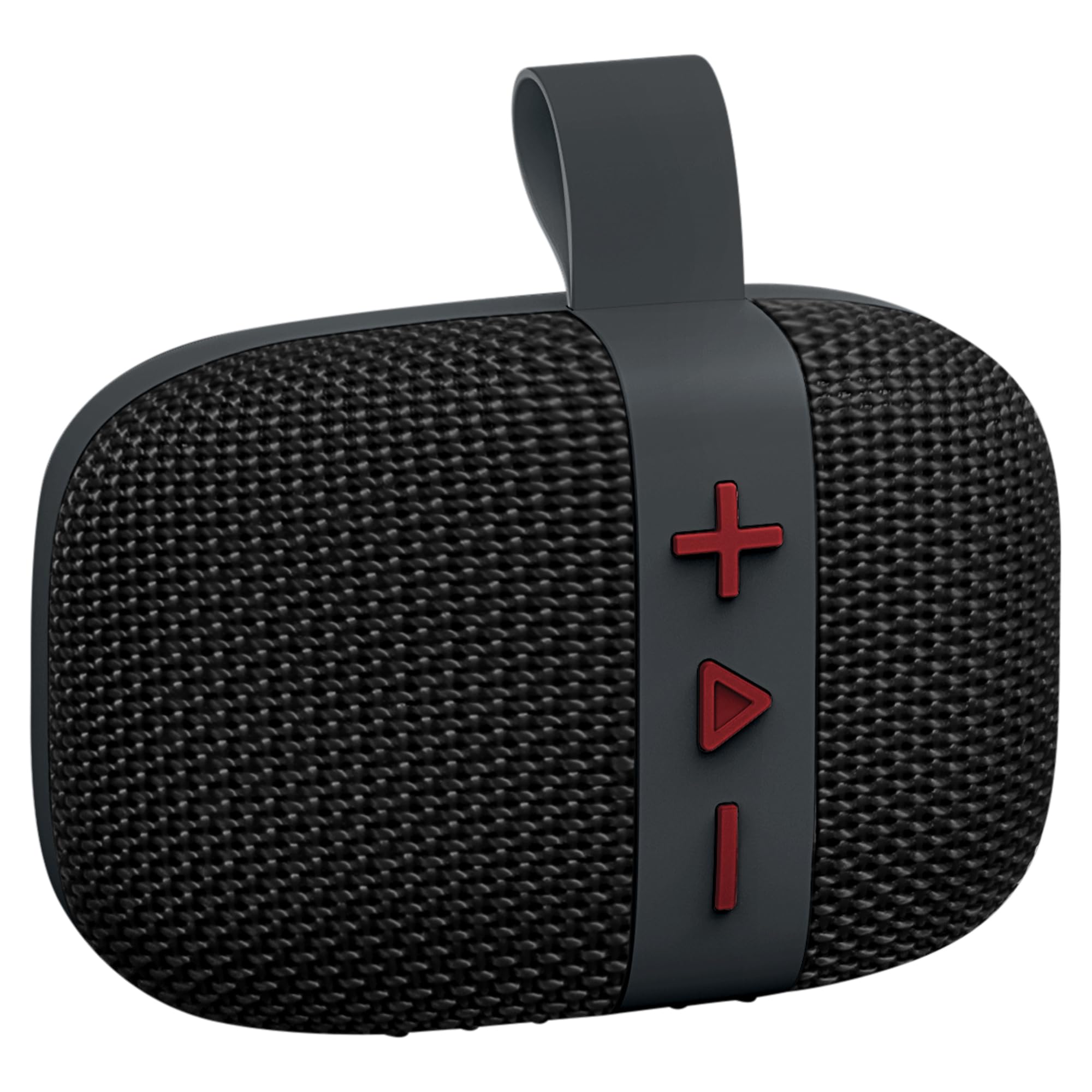
Chithunzi: Patsogolo view of the Fisher SBT294 speaker.
- Spika Grille: Protects the internal speaker driver.
- Mabatani Owongolera: For power, volume, track control, and mode selection.
- Chingwe Chonyamulira: For easy portability and attachment.
- USB-C Doko: Kwa kulipiritsa wokamba nkhani.
Mabatani Owongolera

Chithunzi: Zambiri view of the speaker's control buttons.
- Batani la '+': Dinani pang'onopang'ono kwa nyimbo yotsatira, dinani nthawi yayitali kuti muwonjezere voliyumu.
- 'Play/Pause' Button: Short press to play/pause, long press for power on/off. Short press to answer/end calls. Double press to switch modes (Bluetooth/FM).
- Batani la '-': Dinani pang'onopang'ono kuti mumve nyimbo yam'mbuyo, dinani nthawi yayitali kuti muchepetse voliyumu.
Khazikitsa
1. Kulipiritsa Spika
Before first use, fully charge the speaker. A full charge takes approximately 2 hours.
- Lumikizani chingwe chochazira cha USB-C padoko la USB-C la sipikala.
- Lumikizani mbali ina ya chingwe ku adaputala yamagetsi ya USB (osaphatikizidwe) kapena doko la USB la kompyuta.
- Kuwala kosonyeza kuyitanitsa kudzawunikira panthawi yolipiritsa ndikuzimitsa ikakhala yokwanira.

Image: Speaker connected to a USB-C charging cable.
2. Kuyatsa/Kuzimitsa
- Kuyatsa: Long press the 'Play/Pause' button until you hear a power-on tone.
- Kuzimitsa: Long press the 'Play/Pause' button until you hear a power-off tone.
3. Kuyanjanitsa kwa Bluetooth
Pair your speaker with a Bluetooth-enabled device.
- Ensure the speaker is powered on and in Bluetooth pairing mode (indicated by a flashing LED). If not, double press the 'Play/Pause' button to switch modes.
- Pachipangizo chanu (foni yam'manja, piritsi, laputopu), yambitsani Bluetooth ndikusaka zida zomwe zilipo.
- Select "SBT294" from the list of devices.
- Akangolumikizana, wokamba nkhaniyo adzatulutsa mawu otsimikizira, ndipo LED idzasiya kung'anima.

Image: Bluetooth pairing with a smartphone.
4. Zowona Zopanda Zingwe Stereo (TWS) Pairing
For an enhanced stereo experience, you can pair two SBT294 speakers together.
- Ensure both SBT294 speakers are powered on and not connected to any other Bluetooth device.
- On one speaker (this will be the primary speaker), long press the 'Play/Pause' button until you hear a TWS pairing tone. The speaker will search for another SBT294.
- Ma speaker awiriwa adzalumikizana okha. Kamvekedwe kotsimikizira kadzamveka akangolumikizidwa.
- Now, connect your device to the primary speaker via Bluetooth as described in step 3. Both speakers will play audio in stereo.

Image: Two speakers paired for True Wireless Stereo with a laptop.
Malangizo Ogwiritsira Ntchito
Kusewera Nyimbo
- Sewerani/Imitsani: Short press the 'Play/Pause' button.
- Nyimbo Yotsatira: Dinani pang'onopang'ono batani la '+'.
- Njira Yakale: Dinani pang'onopang'ono batani la '-'.
- Onjezani Pamwamba: Kwa nthawi yayitali dinani batani la '+'.
- Voliyumu Pansi: Kanikizani batani la '-' kwa nthawi yayitali.
Mafilimu a FM
Kusintha kwa wayilesi ya FM:
- Double press the 'Play/Pause' button to cycle through modes until you hear the FM radio prompt.
- In FM mode, short press the 'Play/Pause' button to auto-scan and save available stations.
- Gwiritsani ntchito mabatani a '+' ndi '-' kuti muyende pakati pa masiteshoni osungidwa.
Kuyimba Mopanda Mmanja
When connected to a smartphone via Bluetooth:
- Yankhani Kuyimba: Short press the 'Play/Pause' button when an incoming call rings.
- Malizitsani Kuyimba: Short press the 'Play/Pause' button during a call.
- Kanani Kuyimba: Long press the 'Play/Pause' button when an incoming call rings.
Kusamalira
- Kuyeretsa: Pukutani wokamba nkhaniyo mofewa, damp nsalu. Osagwiritsa ntchito zotsukira abrasive kapena solvents.
- Kukanika kwa Madzi: The speaker is IPX5 waterproof, meaning it can resist a sustained, low-pressure water jet spray. Do not submerge the speaker in water. Ensure the charging port cover is securely closed before exposure to water.
- Posungira: Sungani cholankhulira pamalo ozizira, ouma kutali ndi kutentha kwakukulu ndi kuwala kwa dzuwa.
- Kusamalira Battery: Kuti batire lizigwira ntchito nthawi yayitali, tchajitsani sipika nthawi zonse, ngakhale simukuigwiritsa ntchito kwa nthawi yayitali. Pewani kutulutsa batri yonse pafupipafupi.

Image: Speaker in an outdoor, poolside environment, highlighting its waterproof design.
Kusaka zolakwika
| Vuto | Njira Yotheka |
|---|---|
| Sipika sayatsa. | Onetsetsani kuti wokamba nkhaniyo alipiritsidwa. Lumikizani ku gwero lamagetsi pogwiritsa ntchito chingwe cha USB-C. |
| Sitingathe kulunzanitsa kudzera pa Bluetooth. |
|
| Palibe phokoso kapena kutsika kwamphamvu. |
|
| Kulandila wailesi ya FM sikulandiridwa bwino. |
|
| Kulumikizana kwa TWS kwalephera. |
|
Zofotokozera
| Mbali | Tsatanetsatane |
|---|---|
| Nambala ya Model | Zamgululi |
| Mtundu | Fisher |
| Kulumikizana Technology | Bluetooth 5.3, USB |
| Mphamvu Yotulutsa Sipika | 5W RMS, 10W Peak |
| Kukula kwa Oyendetsa Audio | 45 mm |
| Kuyankha pafupipafupi | 13 khz |
| Kuyesa Kwamadzi | IPX5 |
| Mphamvu ya Battery | 1200 mAh |
| Moyo wa Battery | Up to 5-6 hours (at 50% volume) |
| Nthawi yolipira | Pafupifupi maola 2 |
| Mtundu wa Bluetooth | Mpaka 33 mapazi (10 mita) |
| Makulidwe (W x H x D) | 4.44" x 3.04" x 1.76" |
| Kulemera | 0.55 lbs |
| Zina Zowonjezera | FM Radio, True Wireless Stereo (TWS) Pairing |
Zambiri Zachitetezo
- Musayike cholankhulira pamalo otentha kwambiri, padzuwa lachindunji, kapena pa malawi otseguka.
- Do not attempt to disassemble or modify the speaker. This will void the warranty and may cause damage.
- Yesetsani kuti wokamba nkhani atalikirane ndi maginito amphamvu.
- Gwiritsani ntchito chingwe choperekedwa cha USB-C chokha pakulipiritsa.
- Pewani kumvetsera mokweza kwambiri kwa nthawi yaitali kuti mupewe kuwonongeka kwa makutu.
- Tayani cholankhulira ndi batire yake mosamala malinga ndi malamulo am'deralo.
Chitsimikizo ndi Thandizo
This product comes with a limited warranty. Please refer to the included Warranty Card for details regarding coverage and terms.
For technical support or customer service, please contact the manufacturer, Migear Intl, LLC, or refer to the contact information provided on your warranty card or the official Fisher webmalo.
Wopanga: Migear Intl, LLC
Mtundu wa Chitsimikizo: Zochepa