
1. Mawu Oyamba
This manual provides comprehensive instructions for the installation, operation, and maintenance of your Lloyd's Smart Full HD 1080P Video Intercom System. This system is designed to provide secure access control for your home or office, allowing you to monitor, communicate with, and grant access to visitors remotely.
Please read this manual thoroughly before using the product to ensure proper function and safety. Keep this manual for future reference.
2. Zambiri Zachitetezo
To prevent damage to the product or injury to yourself or others, please observe the following safety precautions:
- Onetsetsani kuti mphamvu zonse zatha musanayike kapena kukonza.
- Installation should be performed by a qualified electrician if you are not familiar with electrical wiring.
- Osaika mankhwalawo kumalo otentha kwambiri, chinyezi, kapena kuwala kwa dzuwa.
- Gwiritsani ntchito adapter yamagetsi yoperekedwa ndi zowonjezera zokha.
- Sungani mankhwalawa kutali ndi madzi ndi zakumwa zina.
- Osayesa kusokoneza kapena kukonza unit nokha. Lumikizanani ndi chithandizo chamakasitomala kuti muthandizidwe.
3. Zamkatimu Phukusi
Onetsetsani kuti zinthu zonse zilipo mu phukusi:
- 1 x Monitor (7'' Color LCD Touchscreen)
- 1 x Outdoor Unit (Doorbell with Camera and Keypad)
- 1 x Wogwiritsa Ntchito
- 1 x Nyumba
- 1 x Rain Cover Bracket
- 1 x Recessed Box
- 1 x AC/DC Adapter
- 1 x Akukweza Bracket
- Wall Plugs and Mounting Screws
- 3 x Zolumikizira
- 1 x Allen Screwdriver
- Zingwe ziwiri zolumikizira

Chithunzi 3.1: Kuthaview of the Lloyd's Smart Video Intercom System components and packaging.
4. Zamalonda Zathaview
4.1. Monitor (Indoor Unit)
- Onetsani: 7-inch color LCD touchscreen with 1020 x 600 px resolution.
- Zokonda Zosinthika: Brightness, contrast, and volume.
- Ntchito: Hands-free intercom, call transfer (requires additional monitor), date, time, and weather display.
- Posungira: Integrated memory for up to 30 photos, supports up to 128 GB memory card (not included).
- Kulumikizana: 2.4 GHz Wi-Fi for stable connection in large areas.
4.2. Outdoor Unit (Doorbell)
- Kamera: 2MP Full HD (1920x1080) resolution.
- Masomphenya a Usiku: Yes, with LED numeric panel.
- Viewngodya: 120 digiri.
- Kuzindikira Zoyenda: Detection distance of less than or equal to 3 meters.
- Audio: 2-way audio with adjustable microphone and speaker volume.
- Control Access: Works with a 12 VDC electric lock (not included), supports 4-6 digit password entry.
- Tamper Button: Sends alerts to your smartphone and triggers an alarm if the outdoor unit is forced.
- Kukhalitsa: IP65 rating for indoor or outdoor use.
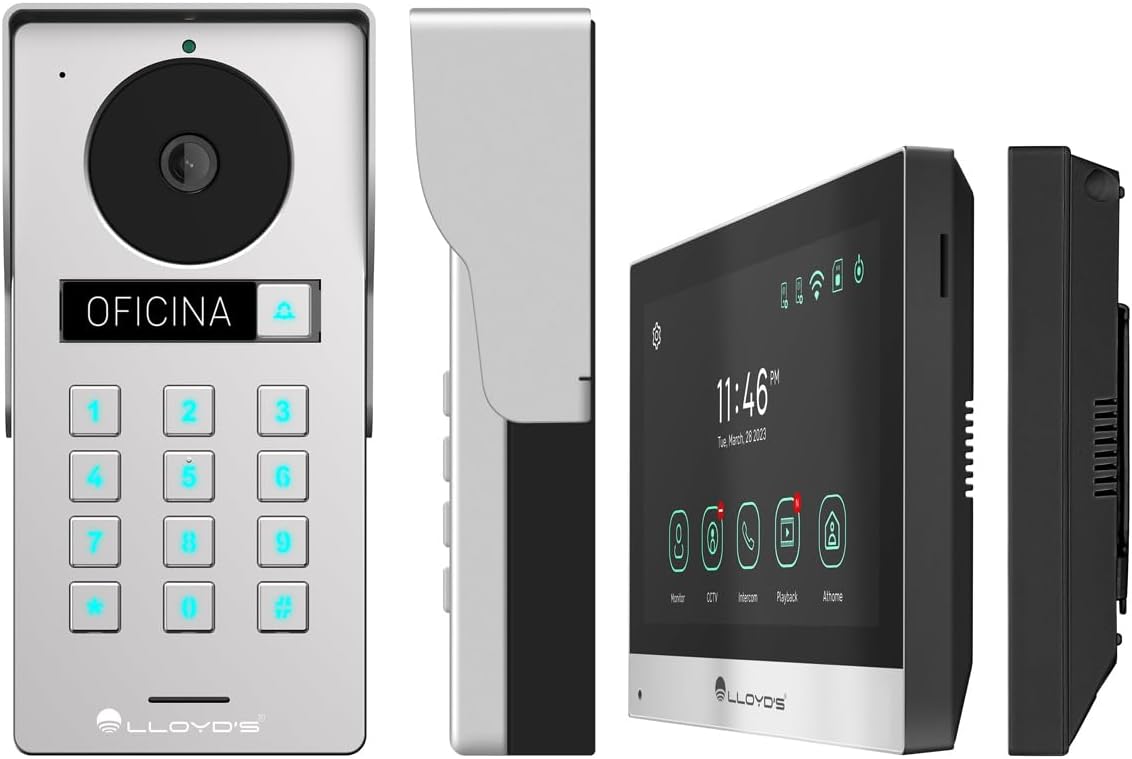
Chithunzi 4.1: Tsatanetsatane views of the outdoor unit and monitor.

Figure 4.2: Key features of the Lloyd's Smart Video Intercom System.
5. Kukhazikitsa ndi Kuyika
5.1. Wiring and Mounting
The system requires a wired connection between the monitor and the outdoor unit. The maximum operating distance is 50 meters using a 4-wire cable (0.5 mm² not included). Follow the wiring diagram provided in the quick start guide for correct connections.
- Kuyika Panja Panja: Choose a suitable location near your entrance, ensuring clear camera view and easy access to the keypad. Use the provided mounting bracket, wall plugs, and screws. The unit is IP65 rated for outdoor use.
- Kuyika Chowunikira: Install the monitor indoors at a convenient height for viewing and interaction. Use the mounting bracket and screws.
- Kulumikiza Mphamvu: Connect the AC/DC adapter to the monitor and a power outlet.
- Electric Lock Connection (Optional): If using an electric lock (12 VDC, not included), connect it to the outdoor unit as per the wiring diagram.
5.2. App and Wi-Fi Connection
To utilize smart features, download the Lloyd's smart home application on your smartphone (compatible with Android 5.0+ and iOS 11+).
- Power on the monitor and outdoor unit.
- On the monitor, navigate to the Wi-Fi settings and connect to your 2.4 GHz Wi-Fi network.
- Open the Lloyd's app on your smartphone and create an account or log in.
- Follow the in-app instructions to add your new video intercom system. This typically involves scanning a QR code displayed on the monitor or manually entering device details.
- Once connected, you will receive notifications and can control the system remotely via the app.
6. Malangizo Ogwiritsira Ntchito
6.1. Answering Calls and Communication
- When a visitor presses the doorbell button, the monitor will ring, and you will receive a notification on your smartphone.
- On the monitor, tap the "Answer" icon to establish two-way audio and video communication.
- On your smartphone, open the app and tap the incoming call notification to answer.
- The intercom communication time is 60 seconds.

Figure 6.1: Communicate with visitors from anywhere using the app or monitor.

Figure 6.2: Receive instant notifications on your smartphone and monitor.
6.2. Door Opening
- Kuchokera ku App: During a call, tap the "Unlock" icon in the app to open the connected electric lock.
- From the Monitor: During a call, tap the "Unlock" icon on the monitor's touchscreen.
- From the Outdoor Unit: Visitors can enter a pre-set 4-6 digit password on the numeric keypad to open the door.
6.3. Kuzindikira ndi Kujambula Mayendedwe
- The system automatically captures photos and videos when motion is detected within 3 meters of the outdoor unit or when someone rings the doorbell.
- You will receive real-time alerts on your smartphone via the app when motion is detected.
- Review recorded events and snapshots through the app or on the monitor.
- The monitoring time for motion detection is 30 seconds.

Figure 6.3: Receive motion detection alerts directly on your smartphone app.

Figure 6.4: Automatic photo and video capture for events.
6.4. Kukula kwa Machitidwe
The system supports expansion for enhanced security and convenience:
- Up to 2 additional Outdoor Units (Doorbell)
- Up to 3 additional Monitors
- Up to 2 additional Cameras
- Up to 2 additional Sensors
(Additional units and sensors are not included and must be purchased separately.)
You can also integrate the system with other Lloyd's smart home products to create customized routines and share device access with family members.
7. Kusamalira
- Kuyeretsa: Use a soft, dry cloth to clean the monitor screen and outdoor unit. Do not use abrasive cleaners or solvents.
- Zosintha pa Mapulogalamu: Periodically check the Lloyd's app for firmware updates to ensure optimal performance and security.
- Kasamalidwe kakusungira: If using a memory card, regularly back up important recordings and delete old files kumasula malo.
8. Mavuto
| Vuto | Chifukwa Chotheka | Yankho |
|---|---|---|
| No image or sound from outdoor unit. | Loose wiring, power issue, unit malfunction. | Check all cable connections. Ensure power adapter is properly connected. Restart the system. |
| Wi-Fi connection unstable or disconnected. | Weak Wi-Fi signal, incorrect password, router issues. | Ensure the monitor is within Wi-Fi range. Re-enter Wi-Fi password. Restart your router. |
| Cannot open door via app/monitor. | Electric lock not connected, lock malfunction, wiring issue. | Verify electric lock connection and functionality. Check wiring between outdoor unit and lock. |
| Palibe zidziwitso zozindikira mayendedwe. | Motion detection disabled, incorrect sensitivity, app notification settings. | Enable motion detection in app settings. Adjust sensitivity. Check smartphone notification permissions for the app. |
| Kanema wosawoneka bwino. | Dirty camera lens, poor lighting, network bandwidth. | Clean the camera lens. Ensure adequate lighting. Check your internet speed. |
9. Zofotokozera
| Mbali | Tsatanetsatane |
|---|---|
| Nambala ya Model | Mtengo wa LC-1373 |
| Kuwunika Kuwonetsera | Chophimba Chokhudza cha LCD cha 7-inch |
| Monitor Resolution | 1020 x 600 px |
| Outdoor Unit Camera Resolution | 2MP Full HD (1920x1080) |
| Viewngodya | 120 digiri |
| Mtundu wa Masomphenya a Usiku | Mpaka 10 metres |
| Mtundu Wozindikira Zoyenda | ≤ 3 mita |
| Kulumikizana Opanda zingwe | 2.4GHz Wi-Fi |
| Kusungirako | Integrated (30 photos), supports up to 128 GB MicroSD (not included) |
| Magetsi | 12 VDC (via AC/DC adapter) |
| Kugwiritsa Ntchito Mphamvu (Kuyimirira) | 4W |
| Kugwiritsa Ntchito Mphamvu (Kugwira Ntchito) | 10W |
| Operating Distance (Wired) | Up to 50m (with 0.5 mm² 4-wire cable) |
| Ingress Protection (Outdoor Unit) | IP65 |
| Monitor Dimensions (H x W x D) | 12.4cm x 18cm x 2.1cm |
| Outdoor Unit Dimensions (H x W x D) | 18cm x 8.7cm x 3.2cm |
| Zida Zogwirizana | Android 5.0 kapena apamwamba, iOS 11 kapena apamwamba |

Figure 9.1: Dimensions of the Monitor and Outdoor Unit.
10. Chitsimikizo ndi Thandizo
For warranty information, please refer to the warranty card included with your product or visit the official Lloyd's website. If you encounter any issues or require technical assistance, please contact Lloyd's customer support.
Thandizo la Makasitomala: Refer to the contact information provided on the product packaging or the official Lloyd's webmalo.
Zothandizira pa intaneti: Pitani Lloyd's Official Store on Amazon kuti mudziwe zambiri zamalonda ndi chithandizo.
11. Official Product Videos
No official seller videos were provided for this product in the available data.