
TEYES CC3 2K
TEYES CC3 2K Car Radio Multimedia Video Player Navigation Stereo GPS Headunit User Manual
Model: CC3 2K
1. Mawu Oyamba
This manual provides comprehensive instructions for the installation, operation, and maintenance of your TEYES CC3 2K Car Radio Multimedia Video Player Navigation Stereo GPS Headunit. Please read this manual thoroughly before using the product to ensure proper functionality and safety.

Chithunzi: Patsogolo view of the TEYES CC3 2K Headunit displaying its user interface.
2. Zambiri Zachitetezo
Nthawi zonse tsatirani malangizo otetezera awa kuti mupewe kuvulala kapena kuwonongeka kwa chipangizocho:
- Musayese kusokoneza kapena kusintha chipangizocho. Izi zitha kuwononga ndikuchotsa chitsimikizo.
- Ensure all wiring connections are secure and correctly insulated to prevent short circuits.
- Avoid operating the device in extreme temperatures or high humidity.
- Musatseke mipata ya mpweya wabwino pa unit.
- Funsani katswiri kuti akhazikitse ngati simukutsimikiza za njira iliyonse.
3. Zamkatimu Phukusi
Onetsetsani kuti zonse zomwe zalembedwa pansipa zilipo mu phukusi:
- 1x Head unit (TEYES CC3 2K)
- 1 x Chingwe chamagetsi
- 1 x USB chingwe
- 1x GPS mlongoti
- 1 x AUX chingwe
- 1x 4G WiFi antenna
- 1x E-book (digital manual)
- 1x Frame (for BMW X5 E39 E53 1999-2006)
- 1x AHD 1080p rear camera
- 1x Kutsuka nsalu
- 1x Wiring diagram

Image: Visual representation of the TEYES CC3 2K Headunit and its included accessories.
4. Unsembe Guide
This section outlines the general steps for installing the TEYES CC3 2K head unit in compatible BMW X5 E39/E53 models (1999-2006). Professional installation is recommended.
4.1 Macheke a Pre-Installation
- Onetsetsani kuti kuyatsa kwa galimotoyo kwazimitsidwa ndipo batire yatsekedwa musanayambe.
- Verify compatibility with your specific BMW X5 model and year.
- Familiarize yourself with the vehicle's existing dashboard layout and wiring.

Image: Comparison of a BMW X5 dashboard before and after installation of the TEYES CC3 2K head unit.
4.2 Removal of Existing Unit
- Carefully remove the trim pieces surrounding the factory radio.
- Unscrew and pull out the existing head unit.
- Disconnect all wiring harnesses and antenna cables from the old unit.
4.3 Kukhazikitsa Mutu wa Chipangizo
- Attach the provided frame to the TEYES CC3 2K head unit.
- Connect the power cable, USB cables, GPS antenna, 4G WiFi antenna, and AUX cable to the corresponding ports on the new head unit. Refer to the included wiring diagram for detailed connections.
- Route the GPS and 4G WiFi antennas to an optimal location for signal reception, typically on the dashboard or under the windshield.
- If installing the rear camera, route its cable from the rear of the vehicle to the head unit and connect it to the designated input.
- Carefully slide the TEYES CC3 2K head unit with the frame into the dashboard opening.
- Secure the unit using the appropriate screws.
- Reattach the dashboard trim pieces.

Image: The OEM panel designed for integrating the TEYES CC3 2K head unit into the vehicle's dashboard.
4.4 Pambuyo Pokhazikitsa
- Lumikizaninso batire lagalimoto.
- Turn on the ignition and power on the head unit.
- Perform initial setup, including language, time, and network settings.
- Test all functions: radio, navigation, Bluetooth, USB, and rear camera.
5. Malangizo Ogwiritsira Ntchito
The TEYES CC3 2K operates on an Android system, offering a user-friendly interface. Navigate using the touchscreen and physical buttons (if applicable).
5.1 Basic Operation
- Yatsani/Zimitsa: Dinani ndikugwira batani lamphamvu.
- Kuwongolera Voliyumu: Adjust using the on-screen controls or steering wheel buttons.
- Screen Yanyumba: Tap the home icon to return to the main interface.
- Chojambula cha App: Swipe up or tap the app icon to access all installed applications.

Image: Illustration of the head unit's compatibility with vehicle steering wheel controls for convenient operation.
5.2 Kuyenda
- Access the pre-installed navigation application from the home screen or app drawer.
- Enter your destination using the on-screen keyboard or voice command.
- The system supports various map types, including North America.
5.3 Masewero a Multimedia
- Wailesi: Select the "Radio" application to tune into FM/AM stations. Supports RDS.
- Kusewera kwa USB: Connect USB devices to the available USB ports for audio and video playback. The unit features 3 USB outputs for data transfer.
- Bluetooth Audio: Pair your smartphone via Bluetooth to stream music.
- Kusewerera Kanema: Amathandiza zosiyanasiyana kanema akamagwiritsa.

Image: Screenshot of the premium local radio interface on the TEYES CC3 2K head unit.
5.4 Kulumikizana
- Wi-Fi/Hotspot: Connect to a Wi-Fi network or use your phone's hotspot for internet access.
- 4G Internet: The unit supports 4G internet connectivity.
- Bulutufi: For hands-free calling and audio streaming, featuring an upgraded QCC3031QFN Qualcomm module.
- CarPlay yopanda zingwe ndi Android Auto: Built-in support for seamless smartphone integration.

Image: Close-up of the three USB output ports provided for data transfer and device connectivity.
5.5 Zapamwamba
- Gawani Screen Mode: Utilize the "Freestyle Combination Split Screen Mode" to run two applications simultaneously.
- DSP Audio Processing: Features 2*DSP ADAU1701 + ROHM32107 for enhanced audio quality, including a 27-segment EQ, sound filtering, and optical/coaxial digital audio output.
- Kumbuyo View Kamera: Pompopompo viewing of the vehicle's rear view and support for video recording with the included AHD 1080p rear camera.
- TEYES Vision & TEYES Yahu: Explore creative 3D software applications.
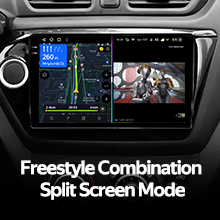
Image: The head unit displaying two applications simultaneously in split-screen mode.

Image: User interface for the DSP audio processing, highlighting the dual DSP chips.
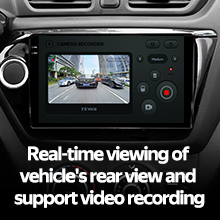
Image: Display showing real-time rear view camera feed with video recording functionality.
6. Kusamalira
Proper maintenance ensures the longevity and optimal performance of your TEYES CC3 2K head unit.
- Kuyeretsa: Use the provided cleaning cloth or a soft, dry cloth to wipe the screen and unit exterior. Avoid abrasive cleaners or solvents.
- Zosintha pa Mapulogalamu: Periodically check for and install software updates to ensure the latest features and bug fixes.
- Kutentha: Pewani kuyatsa chipangizocho ku dzuwa kwa nthawi yayitali kapena kutentha kwambiri.
7. Mavuto
Onani gawo ili kuti mupeze zovuta zomwe zimafanana komanso mayankho ake. Vuto likapitilira, funsani thandizo lamakasitomala.
| Vuto | Chifukwa Chotheka | Yankho |
|---|---|---|
| Chigawo sichimayatsa. | Loose power connection, blown fuse, vehicle battery disconnected. | Check power cable connections. Inspect vehicle fuses. Ensure battery is connected. |
| Palibe kutulutsa mawu. | Volume too low, audio cables disconnected, incorrect audio source selected. | Increase volume. Verify speaker wire connections. Select correct audio source (e.g., Radio, USB, Bluetooth). |
| GPS signal weak or lost. | GPS antenna improperly placed or disconnected. | Ensure GPS antenna is securely connected and placed in an unobstructed location. |
| Mavuto okhudzana ndi Bluetooth. | Device not paired, Bluetooth off on phone/unit, interference. | Onetsetsani kuti Bluetooth yayatsidwa pa zipangizo zonse ziwiri. Bwezeraninso chipangizocho. Pitani pafupi ndi chipangizocho. |

Image: An icon representing the Frequently Asked Questions (FAQ) section, indicating support resources.
8. Zofotokozera
| Mbali | Tsatanetsatane |
|---|---|
| Nambala ya Model | CC3 2K |
| Kukula Kwawonetsero | 9.5 inchi |
| Kuwonetsa Technology | 2K In-cell Display, Gamut Coverage 157% |
| Opareting'i sisitimu | Android 10 |
| Purosesa | 8 cores 2.0GHz |
| Ram | 6 GB |
| Rom | 128 GB |
| Kulumikizana | Bluetooth (QCC3031QFN Qualcomm), USB, Wi-Fi, Hotspot, 4G Internet |
| Njira Zotulutsa Audio | Sitiriyo |
| DSP | 2*DSP ADAU1701 + ROHM32107 |
| Kutulutsa Kwamawu | Optical and coaxial digital audio output |
| Zapadera | Touchscreen, Built-in wireless CARPLAY and ANDROID AUTO, RDS support, TEYES Vision & TEYES Yahu software, Real-time rear view with recording. |
| Included Rear Camera | AHD 1080p |
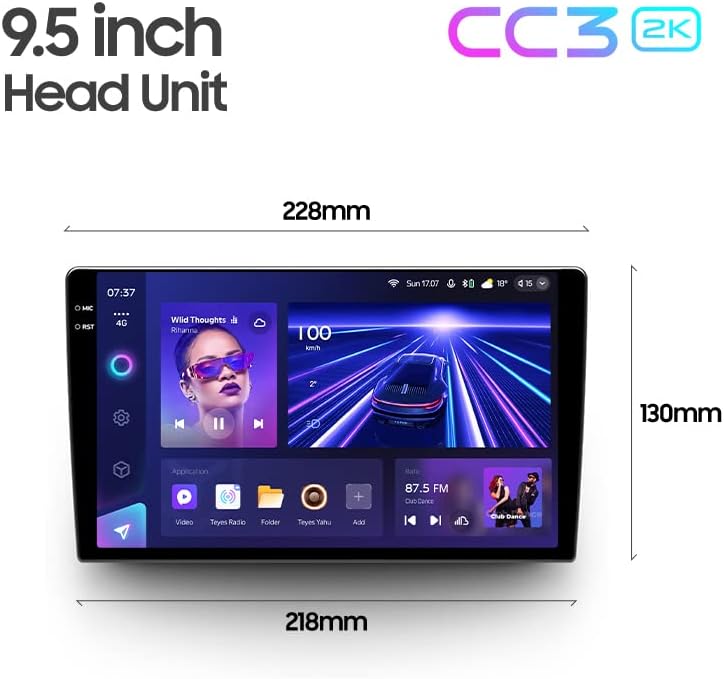
Image: Diagram showing the dimensions of the TEYES CC3 2K Headunit.
9. Chitsimikizo ndi Thandizo
The TEYES CC3 2K Headunit comes with a 1-zaka chitsimikizo kuyambira tsiku logula.
For technical support, warranty claims, or further assistance, please contact TEYES customer service through their official webkapena kwa wogulitsa komwe chinthucho chinagulidwa. Sungani umboni wanu wa kugula kuti chitsimikizo chitsimikizike.
Manufacturer: Shenzhen TEYES High tech Co., Ltd.