
1. Zamalonda Zathaview
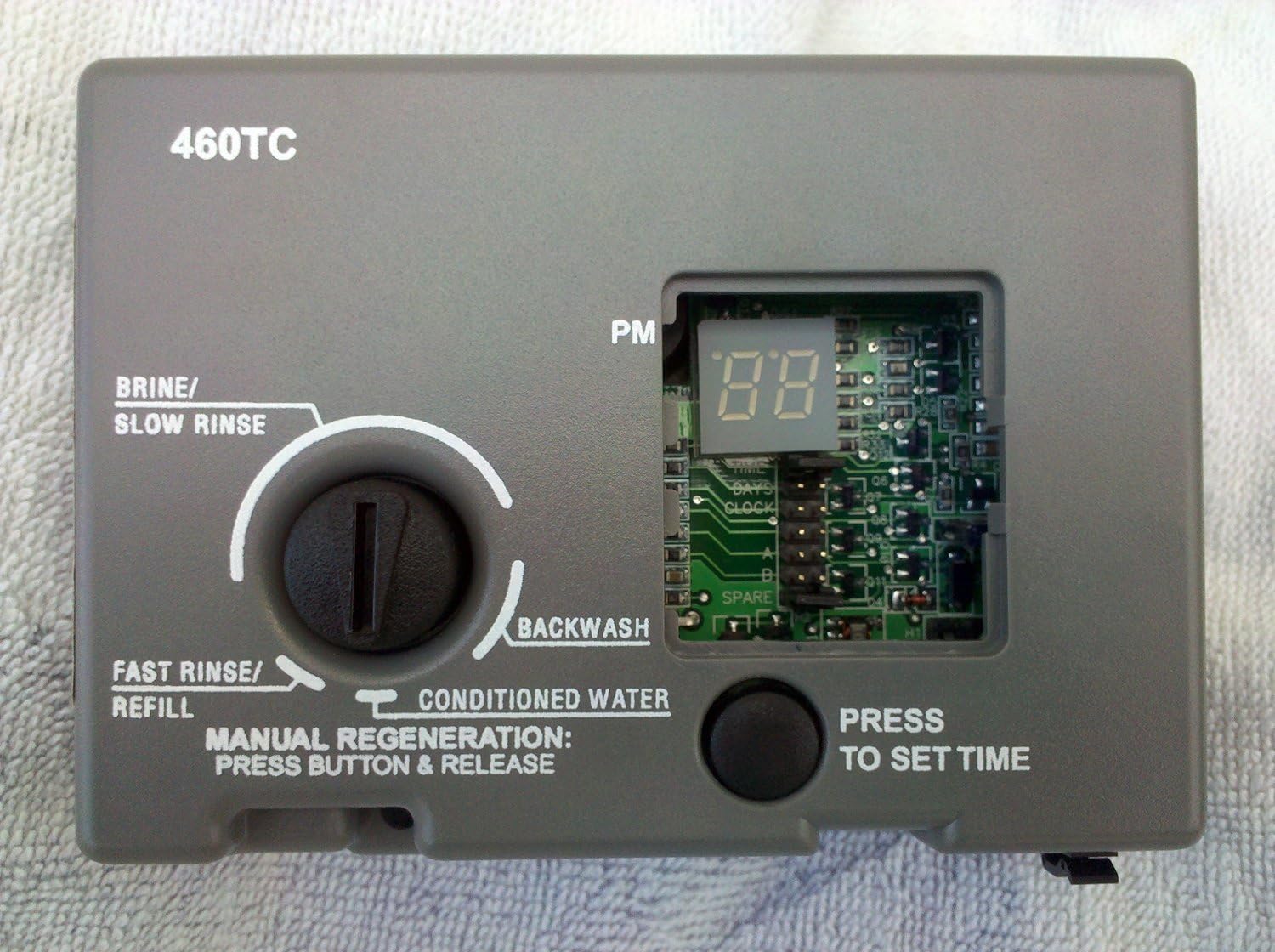
The Autotrol 460TC is a complete replacement timer assembly designed for 440 series water treatment systems. This electronic 7-day programmed timer operates at 60 Hz and includes a 12-volt AC transformer. It is engineered to replace previous 440, 440i, and 1040778 Timer Assemblies, ensuring compatibility with a range of Autotrol valves including older 150, 155, 160, 163, 168 series, and newer 255, 263, and 268 series valves that currently utilize 440, 440i, 440iHV, or 460i timers. The 460TC allows for precise control over regeneration cycles, enabling users to set specific days for automatic regeneration.

Figure 1: Autotrol 460TC Replacement Timer Assembly with included 12-volt AC transformer.
2. Unsembe Guide
Installation of the 460TC timer assembly is designed to be straightforward. Before beginning, ensure the water supply to the system is turned off and the system is depressurized.
2.1 Removing the Old Timer Assembly
- Locate the locking pin at the bottom of the existing timer assembly.
- Flip the locking pin counter-clockwise to release it.
- Carefully slide the locking pin out.
- The entire timer assembly should now slide upwards and off the valve.
- Disconnect any electrical connections, including the transformer.
2.2 Installing the New 460TC Assembly
- Before placing the new assembly, observe the position of the valve trigger. If applicable, use a flat screwdriver to position the actuator to the right of the shaft to ensure proper alignment.
- Align the shaft of the valve with the opening in the new 460TC timer assembly.
- Slide the new timer assembly downwards into place until it is fully seated.
- Re-insert and secure the locking pin by flipping it clockwise.
- Connect the included 12-volt AC transformer to the timer assembly and plug it into a suitable electrical outlet.

Chithunzi 2: Patsogolo view of the Autotrol 460TC Timer Assembly, showing the control knob and digital display.
Chithunzi 3: Zamkati view of the 460TC Timer Assembly circuit board, showing components and jumper pins.
3. Kugwiritsa Ntchito ndi Mapulogalamu
The 460TC timer assembly features an electronic display and buttons for setting the time of day and regeneration schedule. Programming instructions are crucial for optimal performance.
3.1 Programming the 460TC
The following image provides a detailed diagram and instructions for programming the unit:

Figure 4: Programming instructions for the Autotrol 460TC, detailing clock, time, and day settings.
3.2 Kukhazikitsa koloko
- Move the jumper to the set of pins next to the word WACHI (refer to Figure 4, Figure 8 in the diagram).
- Dinani pa BLACK TIME SET button until the desired clock setting is displayed. The clock range is 0 to 1. Select 0 for standard AM/PM clock or 1 for 24-hour clock.
3.3 Time of Day Setting
- Move the jumper to the set of pins next to the word NTHAWI (refer to Figure 4, Figure 5 in the diagram).
- Dinani pa BLACK TIME SET button until the desired time of day is displayed. The closest hour is indicated by a light next to the letters PM on the display window.
- Zindikirani: The unit is factory set to regenerate at 2:00 A.M. If you need to have the unit regenerate at an earlier or later time, simply set the current time of day accordingly (e.g., to have the unit regenerate at 4:00 A.M.—two hours later—set the clock two hours earlier than the actual time of day).
- Zindikirani: The Timer Locking Pin should always be horizontal (Figure 5 in the diagram) during operation.
3.4 Days Setting (Regeneration Frequency)
- Move the jumper to the set of pins next to the word MASIKU (refer to Figure 4, Figure 6 in the diagram).
- Dinani pa BLACK TIME SET button until the desired number of days between regeneration is displayed. The range is from 1 to 99 days, with every 3rd day as the default.

Figure 5: Close-up of jumper pins on the 460TC circuit board, indicating their role in configuration.
4. Kusamalira
The Autotrol 460TC timer assembly is designed for minimal maintenance. Regular checks can help ensure its longevity and proper function.
- Kuyeretsa: Periodically wipe the exterior of the timer assembly with a soft, damp nsalu yochotsera fumbi ndi zinyalala. Pewani kugwiritsa ntchito mankhwala amphamvu kapena zotsukira zowawa.
- Zolumikizira zamagetsi: Ensure the transformer connection remains secure and free from damage. Do not expose the unit to excessive moisture.
- Kusunga Chikumbukiro: The 460TC features Nonvolatile Random-Access Memory (NOVRAM) to retain programming data during power outages. This memory stores the time of day, number of days between regenerations, and the number of regenerations since the last reset. If a power outage occurs, the NOVRAM will restore the data to the microprocessor. However, if the outage is prolonged (months or years), or if the unit displays a blank screen, reprogramming may be necessary.
5. Mavuto
If you encounter issues with your 460TC timer assembly, consider the following common troubleshooting steps:
- Unit Not Powering On / Blank Display:
- Check the power outlet to ensure it is functional.
- Verify that the 12-volt AC transformer is securely connected to both the timer assembly and the power outlet.
- If the display remains blank after a prolonged power outage, reprogramming may be required.
- Incorrect Time or Regeneration Schedule:
- Refer to Section 3, "Operating and Programming," to re-program the clock, time of day, and regeneration days.
- Ensure the jumpers are correctly positioned for the desired setting (CLOCK, TIME, or DAYS).
- Regeneration Not Occurring:
- Verify that the regeneration days are set correctly.
- Check the water pressure and ensure the system is not bypassed.
- Ensure the timer locking pin is horizontal during operation.
- Physical Installation Issues:
- If the unit feels loose or is not engaging properly, re-check the locking pin and ensure the assembly is fully seated on the valve shaft.
- Confirm that the valve trigger is correctly positioned as described in the installation section.
6. Zofotokozera
| Mbali | Kufotokozera |
|---|---|
| Wopanga | Autotrol |
| Gawo Nambala | Mtengo wa 460TC |
| Kulemera kwa chinthu | 1.05 mapaundi |
| Miyeso Yazinthu | 8 x 5 x 2 mainchesi |
| Nambala Yachitsanzo Yachinthu | Mtengo wa 460TC |
| Gwero la Mphamvu | AC |
| Kuchuluka Kwa Phukusi la Zinthu | 1 |
| Mtundu | Imvi |
| Mabatire Akuphatikizidwa? | Ayi |
| Mabatire Amafunika? | Ayi |
| Tsiku Loyamba Likupezeka | Novembala 20, 2011 |
7. Chidziwitso cha Chitsimikizo
The Autotrol 460TC Replacement Timer Assembly comes with a comprehensive warranty policy:
- 90-Day Free Exchange Warranty: For the first 90 days from the date of purchase, if the unit is defective, a replacement will be shipped to you at no cost for postage. You are responsible for returning the defective unit in the same box, covering the return postage to the manufacturer.
- 91-365 Day Exchange Warranty: From day 91 to day 365, an exchange warranty is available with a $6.00 shipping and handling fee. You will place a new order for the replacement, and credit for the defective item will be issued upon its return.
- Remaining Years 2-5 (Parts Warranty): For years 2 through 5, a parts warranty applies. This includes a 15% handling fee plus applicable shipping and handling fees for replacement parts.
8. Thandizo
For further assistance, technical support, or warranty claims, please refer to the contact information provided with your purchase documentation or visit the official Autotrol website. When contacting support, please have your model number (460TC) and purchase date readily available.