
1. Mawu Oyamba
This manual provides essential information for the installation, operation, and maintenance of your Intel Pentium D 915 Dual-Core CPU. The Intel Pentium D 915 is a dual-core processor designed for Socket 775 motherboards, offering a clock speed of 2.8 GHz and a 4 MB L2 cache. It is engineered to enhance your computer's processing capabilities for various applications.
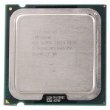
Chithunzi 1: Intel Pentium D 915 Dual-Core CPU. This image displays the top view of the processor, showing the Intel logo and model number, with the heat spreader visible.
2. Zofunika Kwambiri
- Mtundu wa Purosesa: Intel Pentium D 915 Desktop Dual-Core Processor
- Kuthamanga kwa CPU: 2.8 GHz
- Liwiro la Basi: 800 MHz
- L2 Cache: 4 MB (2 x 2MB)
- Mtundu wa Soketi: Socket 775 (LGA 775)
- Voltage manambala: 1.225V - 1.325V VID
- Zamakono: Enhanced Intel Speedstep Technology, Intel EM64T, Enhanced Halt State (C1E), Execute Disable Bit
3. Kukhazikitsa ndi Kuyika
Installing a CPU requires careful handling and adherence to safety procedures. It is recommended that installation be performed by a qualified technician. Always consult your motherboard's manual for specific installation instructions, as procedures may vary.
3.1 Njira Zotetezera
- Kuzimitsa Mphamvu: Ensure the computer is completely powered off and unplugged from the wall outlet before beginning installation.
- Kutuluka kwa Static: Wear an anti-static wrist strap or frequently touch a grounded metal object to prevent electrostatic discharge (ESD), which can damage components.
- Gwirani Mosamala: Hold the CPU by its edges. Avoid touching the gold contacts or the underside of the processor.
3.2 Njira Zoyikira (Zambiri)
- Konzani Motherboard: Tsegulani lever ya socket ya CPU pa bolodi lanu.
- Align CPU: Carefully align the CPU with the socket. Look for a small triangle or notch on the CPU and the socket to ensure correct orientation. Do not force the CPU into the socket; it should drop in easily.
- Secure CPU: Once the CPU is seated correctly, close the socket lever to secure the processor.
- Ikani Thermal Paste: Apply a small amount of high-quality thermal paste to the center of the CPU's heat spreader.
- Ikani CPU Cooler: Mount the CPU cooler according to its manufacturer's instructions, ensuring proper contact with the CPU and secure attachment to the motherboard.
- Lumikizani Fani: Lumikizani chingwe cha fan cha CPU_FAN pamutu wosankhidwa wa CPU_FAN pa boardboard.
4. Ntchito
Once installed, the Intel Pentium D 915 CPU will operate automatically within your system. Its dual-core architecture allows for efficient multitasking and improved performance in applications that can utilize multiple processing threads. The 2.8 GHz clock speed and 4 MB L2 cache contribute to faster data access and processing.
The Enhanced Intel Speedstep Technology dynamically adjusts the processor's voltage and frequency, optimizing power consumption and heat generation based on system load. Intel EM64T enables the processor to run 64-bit operating systems and applications, while the Execute Disable Bit provides enhanced security against certain types of malicious software.
5. Kusamalira
The Intel Pentium D 915 CPU itself requires no direct maintenance. However, maintaining the overall cooling system of your computer is crucial for its longevity and stable performance.
- Kuchotsa Fumbi: Regularly clean dust from your CPU cooler's heatsink and fan, as well as other case fans, using compressed air. Dust buildup can impede airflow and lead to overheating.
- Thermal Paste: Over several years, thermal paste can dry out. If you notice consistently high CPU temperatures, consider reapplying fresh thermal paste after carefully cleaning the old paste from the CPU and heatsink. This procedure should be done by an experienced user or technician.
- Mayendedwe ampweya: Onetsetsani kuti bokosi la kompyuta yanu lili ndi mpweya wokwanira. Sungani malo olowera komanso otulutsa mpweya popanda zopinga.
6. Mavuto
If you encounter issues after installing or while using your Intel Pentium D 915 CPU, consider the following common troubleshooting steps:
- Dongosolo Silikuyamba:
- Verify the CPU is correctly seated in the socket and the lever is fully closed.
- Ensure the CPU cooler is properly installed and its fan is connected to the motherboard.
- Check all power connections to the motherboard and components.
- Confirm your motherboard BIOS supports the Pentium D 915 CPU. An older BIOS version might require an update.
- Kutentha kwambiri:
- Ensure the CPU cooler is making good contact with the CPU and is securely mounted.
- Onetsetsani kuti phala lotentha lagwiritsidwa ntchito moyenera komanso mofanana.
- Clean any dust from the CPU cooler heatsink and fan.
- Check case airflow and fan operation.
- Kusakhazikika/Kuwonongeka Kwadongosolo:
- Ensure the CPU is not overclocked beyond its stable limits. The Pentium D 915 is not recommended for overclocking due to its voltage makhalidwe.
- Check RAM modules for proper seating and functionality.
- Sinthani madalaivala a mamaboard ndi BIOS kuti agwirizane ndi mitundu yaposachedwa.
If problems persist, consult your motherboard's manual or contact Intel support for further assistance.
7. Mafotokozedwe aukadaulo
| Mbali | Tsatanetsatane |
|---|---|
| Mtundu | Intel |
| Wopanga CPU | Intel |
| CPU Model | Pentium D915 |
| Kuthamanga kwa CPU | 2.8 GHz |
| CPU Socket | LGA 775 |
| processor Series | Pentium |
| Cache yachiwiri | 4 MB |
| Cache Memory Installed Size | 4 MB |
| Chiwerengero cha processor | 1 (Dual-Core) |
| Nambala ya Model | 915 |
| Kulemera kwa chinthu | 3.36 pawo |
| UPC | 683728207793 |
| ASIN | B003BLU8IO |
8. Chitsimikizo ndi Thandizo
For information regarding the warranty of your Intel Pentium D 915 CPU, please refer to the official Intel warranty documentation provided with your purchase or visit the official Intel website. Intel provides various support resources, including technical documentation, drivers, and customer service, to assist with product-related inquiries.
You can typically find support information and contact details on the official Intel support webtsamba: Thandizo la Intel